How to Locate PayPal Order ID
The first step is to go PayPal website and log into your account.

Once logged in, locate the payment made to our website.
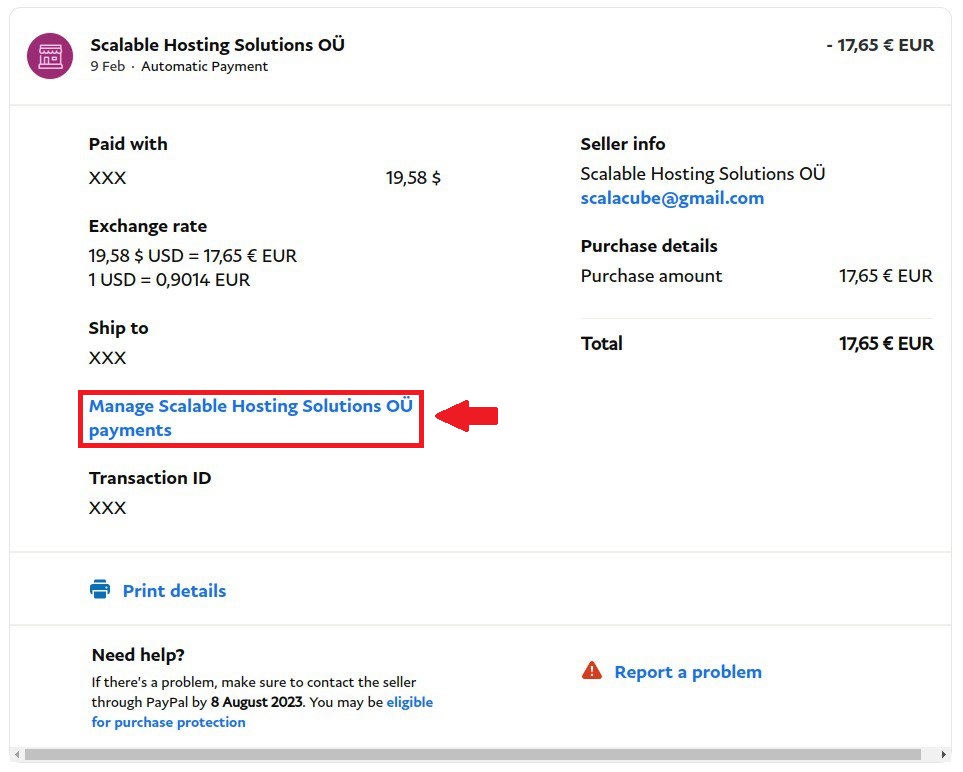
Click on the Transaction and open it to view more details.
Click on "Manage Scalable Hosting Solutions OÜ payments"
Locate the payment Description.
In the Description, it says "Minecraft 6G Server Rental (America) - Order #1168366"
The Order ID in this case is "Order #1168366"
Summary:

Once logged in, locate the payment made to our website.

Click on the Transaction and open it to view more details.
Click on "Manage Scalable Hosting Solutions OÜ payments"
Locate the payment Description.

In the Description, it says "Minecraft 6G Server Rental (America) - Order #1168366"
The Order ID in this case is "Order #1168366"
Summary:
- Log into PayPal
- Locate Payment
- View the Transaction
- Manage the payment