How to Create an Invoice in PayPal
The first step is to go PayPal website and log into your account.

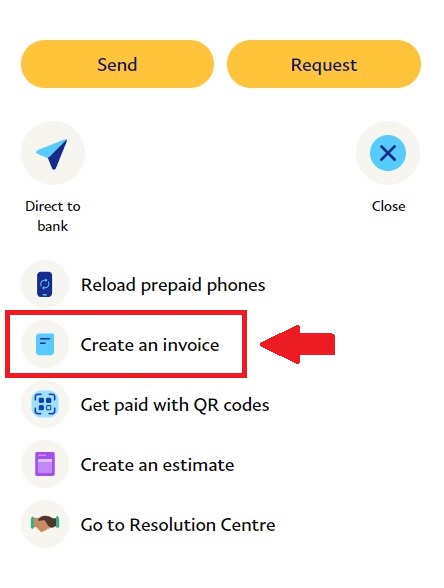
Once logged inside your PayPal account, click on "More" and select "Create an invoice".
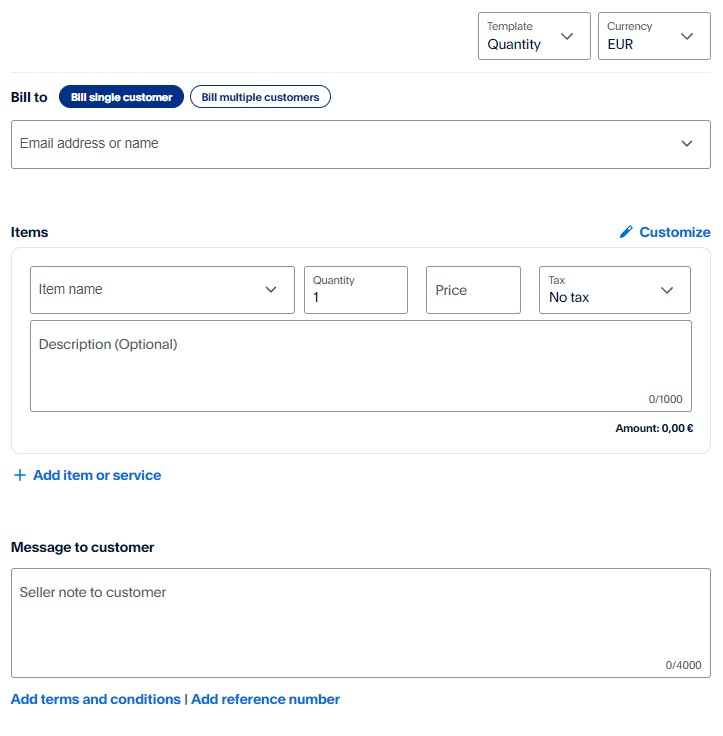
If you are on the Invoice creation screen, make sure you add all the required details in the description:
Once the details are entered correctly, click on "Send".
Summary:

Once logged inside your PayPal account, click on "More" and select "Create an invoice".
If you are on the Invoice creation screen, make sure you add all the required details in the description:
- Type of service: Affiliate program payment/Partnership payment (Choose one);
- First and Last Name;
- Full Address (country, city, postcode, street, building, apartment);
- Scalacube account e-mail address
Once the details are entered correctly, click on "Send".

Summary:
- Log into PayPal
- Create an invoice
- Fill invoice details
- Send Invoice