How To Upgrade Your Planter In Schedule 1
Alright, green thumbs of Hyland City, let’s talk business—literal plant-based business. In Schedule 1, the grind starts with grow tents and ends with full-on automated farming empires. But before you can even think about turning your little operation into a cash-flush powerhouse, you’ve got to make those seeds work harder. You start out with the humble grow tent: eight products per crop. Not bad, but also not going to cut it when you’re aiming for Westville-level success. So how do you evolve from budget botanist to yield overlord? Simple: it’s time to upgrade your Schedule 1 planter. Let’s break it down step by step—no fluff, just facts. And a little fun, obviously.
Why Upgrade Your Schedule 1 Planter?

Make Your Own game Server
You could keep chugging along with the basic grow tent. But with rare seeds getting harder to come by later in the game, squeezing out as much product as possible becomes critical. More yield = more product = more profit = happy Hyland you. Plus, upgrading your planter Schedule 1 isn’t just about numbers. It also lets you flex with faster growth times and better resource management once you’ve got the right setup. Efficiency is king in the streets of Schedule 1.
Step 1- Unlock the Warehouse
First things first—you’re not upgrading anything including your Schedule 1 planter without unlocking the warehouse. This bad boy opens up once you hit a decent popularity level and complete the second supplier mission in the Westville contact chain. You’ll get a quest to talk on a Payphone (very spy movie) and then you’re in. The warehouse is located smack in the middle of the map, just south of your very first motel room. Quick tip: it only opens after 6 PM, so don’t show up at noon expecting deals.
Step 2- Meet Oscar the Salesman
Inside the warehouse, hang a right and you’ll spot Oscar—Hyland’s most clutch item salesman. This guy’s got the goods. You’ll need cash, though, so swing by the ATM nearby if you’re running low. From Oscar’s inventory, you’re looking for one thing: Schedule 1 pots. That’s right, fancy new planters that make your crops do more.

Step 3- Buy Your First Pot
At first, you’ll only have access to the Schedule 1 Simple Pot, but as you rank up and climb the street cred ladder, two better versions unlock. Each of these pots boosts your output from 8 to 12 products per seed—50% more yield, baby! Sounds like magic? It kind of is. But there’s a catch: Schedule 1 pots don’t work alone.
Step 4- Get a Suspension Rack and Grow Light
You’ll need a setup to match your ambition. That means buying:
- One Suspension Rack
- One Grow Light For every pot you want to use. Yes, it's a bit of an investment, but once everything’s in place, you’ll be rolling in product faster than ever. Think of it like assembling your own personal plant assembly line.
Step 5- Set It All Up
Now for the fun part: placement. You can place your upgraded setup anywhere you’ve got space, but it’s important to get the layout right.
- Place the pot on the ground.
- Directly above it, place the suspension rack.
- On top of the suspension rack, add the grow light. Boom. That’s your upgraded growing station. Not only does this new setup give you 12 products per plant, but the higher-tier grow lights also reduce the time it takes for your crop to mature. You’ll be harvesting faster and more often—aka the Schedule 1 dream.
Bonus Tips for Max Efficiency
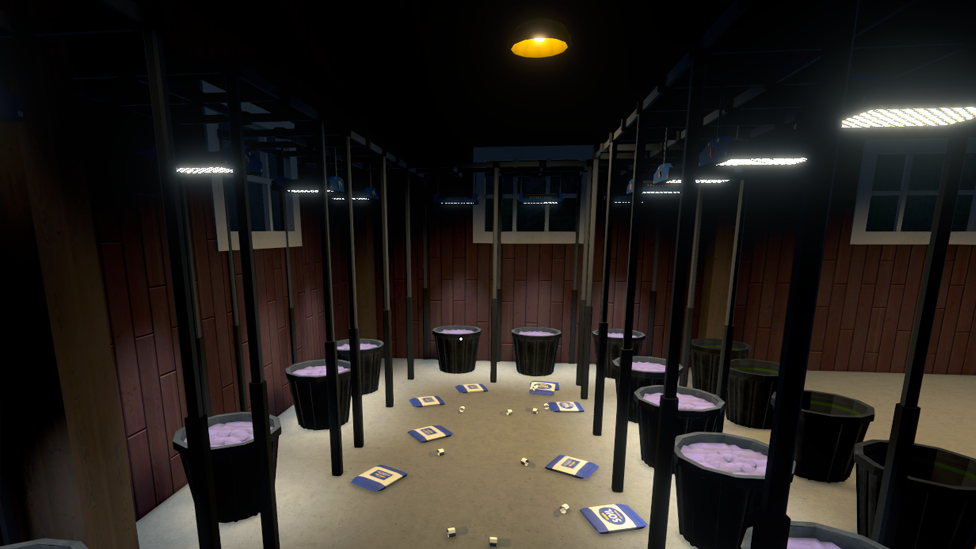
- Stack them up: If you’ve got space, don’t stop at one pot. Multiple pots = mega yield.
- Plan ahead: Make sure you’ve got enough suspension racks and grow lights in your inventory before placing a bunch of pots. Running back and forth to Oscar is a vibe killer.
- Experiment with spacing: Different properties have different layouts—optimize your setup so your space looks good and works like a dream.
Lag-Free Gaming Starts with ScalaCube
If you want smooth gameplay, zero lag, and full control, ScalaCube’s dedicated server hosting is the way to go. Designed for gamers who need reliability and speed, ScalaCube offers 99.9% uptime, zero latency, and custom server configurations to match your unique setup. With full FTP access, mod and plugin support, automated backups, and 24/7 support, you’ll be fully equipped to host intense sessions without interruptions. Plus, DDoS protection and global server locations keep your empire safe and always online. Now take all that performance and drop it into Schedule 1—a gritty crime sim where you rise from a broke dealer to a kingpin in the rough streets of Hyland Point. With drug production, street distribution, automated operations, and deadly cartel warfare, you need a server that can keep up.
Wrapping Up
If you’re serious about growing your empire in Schedule 1, upgrading your planter is a non-negotiable move. That 8-per-seed lifestyle just won’t cut it in the long run, especially when rare seeds become harder to find and every product counts. So unlock that warehouse, hit up Oscar, and start decking out your farm with pots, suspension racks, and glowing grow lights. Your yield—and your bank account—will thank you.
FAQs
How do I unlock better pots in Schedule 1?
You unlock better pots as you rank up and progress in the game. Keep completing missions and boosting your popularity to access higher-tier gear from Oscar.
Can I use grow lights without pots?
No. Grow lights and suspension racks are specifically designed to work with pots. They won’t do much on their own.
Do I need a separate suspension rack and grow light for every pot?
Yes. Each pot needs its own rack and grow light directly above it to function properly and boost your crop yield.