How to Move Bases in Palworld
Sometimes, we all need a change of scenery - and when it comes to your game of Palworld, this is no different! Still, whether you’re just starting out or deep into your adventure, there often comes a time when you realise that your current base setup just isn’t working anymore. Maybe resources are too far away, or perhaps your explorations have seen you venturing into a different part of the map? Well, whatever the reason, knowing how to move bases in Palworld can save you a lot of frustration — and set you up for a more efficient, enjoyable game going forward. To this end, today, we’re exploring this simple idea to make sure you know how to move bases in your next game of Palworld.
Why You Might Want to Move Your Base

Make Your Own Palworld Server
Before we look at the process itself, it’s worth considering why moving a base might be necessary in the first place. There are actually a couple of possibilities here! Now, for some players, the main issue is access to resources (or even access to the base itself!) Indeed, early-game bases are often set up quickly, which means they might be far from essential crafting materials, ores, or rare Pals. Over time, this can make your day-to-day gameplay much less efficient.
In addition, others may find themselves getting regularly attacked by enemy factions or aggressive Pals in certain areas (especially as you leave your base, if enemies are located close by). If your defences aren’t keeping up with the task due to hoardes of seemingly unstoppable foes, it might just be easier to relocate than to constantly rebuild. And sometimes, it’s simply about upgrading — moving to a bigger, more defensible, or more scenic spot can make your Palworld experience much more enjoyable. Whatever the case might be, there’s no point just settling for a second-best base; so, if your base location isn’t doing what you need it to, be sure to move. Similarly, your game’s server can also fall under the same concept, with a slow, lagging server massively dragging down your gameplay; given this, make sure you start your game with a Palworld dedicated server for a more rewarding experience overall, with full access to your server settings and 24/7 uptime for a lag-free game.
How to Move Bases in Palworld
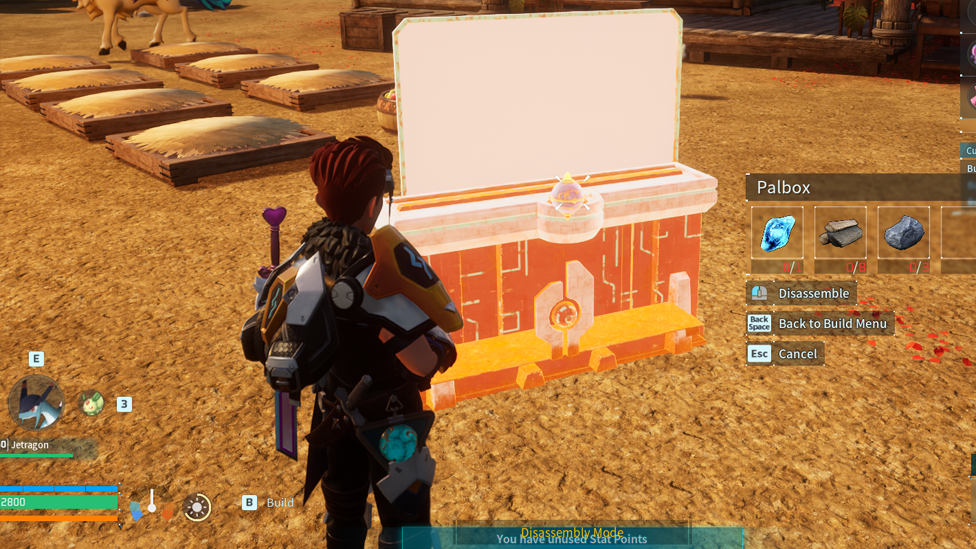
So, we know that it’s possible to move your base in Palworld, but is it hard? Well, the good news here is that moving your base in Palworld is actually very straightforward once you know how! Now, your base location is tied to your Palbox; as such, to move a base, you’ll need to dismantle your current Palbox and place it in a new location. To do this, simply open the Build Menu, then approach your Palbox; then, select the option to Disassemble the box. Keep in mind that disassembling your Palbox will automatically disassemble all of your base structures; it will also unassign Pals working at your base, so be ready to set them up again in the new location. From there, simply place your Palbox down in your new, preferred location, and your new base will be active. This will allow you to rebuild your crafting stations, defences, and storage exactly where you want them. Of course, keep in mind that, if you’re moving to a high-level area, you’ll need to be ready for tougher enemies and harsher environments. If possible, scout out your new location thoroughly before dismantling your old base.
You Can Have Multiple Bases!

While moving your base in Palworld can undoubtedly be handy, it’s worth keeping in mind that it may not always be necessary! Indeed, you can actually have multiple bass, with your second unlocking at Level 10 - that’s pretty early on. So, if you haven’t built your spare bases yet, don’t rush to move your old base too quickly.
FAQs
Can I have more than one base in Palworld?
Yes! Surprisingly, you can actually have up to three active Palworld bases at a time. However, these don’t all unlock immediately.
Does moving my base in Palworld cost resources?
Not directly; however, although your building materials should be refunded when you disassemble your old base, you’ll still need to use them again to rebuild your structures at the new location.
Will my Pals automatically follow me to my new base in Palworld?
Your Pals will be sent to your box after you disassemble your base in Palworld, so you will need to reassign them after setting up your new location.
Final Thoughts
Knowing how to move bases in Palworld is definitely a must for any playthrough, no matter what your main goals might be. So, whether you’re chasing better resources, looking for safer ground, or simply wanting a change of scenery, make sure to consider today’s tips to make the base move a smooth experience.