How to Destroy and Move Structures in Palworld
There comes a point in every Palworld playthrough where you know your base could be better—maybe that defensive barrier needs moving, or maybe your campfire’s blocking access to your crossbow station? Whatever the case, sometimes, we all need to make a change - but how do you actually do that? You can’t just slide everything around easily, but thankfully, you don’t need to rebuild your entire base from scratch - and we’re looking at the key things you need to know about destroying and moving structures in Palworld.
Why You Might Want to Rearrange Your Base in Palworld
Make Your Own Palworld Server
There are many different reasons that you might want to rearrange your base in Palworld - however, it’s not necessarily obvious at the outset why this might actually be helpful. Of course, your base’s layout isn’t always easy to determine, especially in the early game when you’re just learning how to create an optimal base layout. Given this thought, after starting a new game on your own private Palworld server, boasting 24/7 uptime so you can build and rearrange to your heart’s content, there’s a good chance you’ll need to move things around from time to time.
Plus, in many cases, you may need to upgrade an old structure, and knowing how to demolish will invariably prove essential in this case. After all, you probably won’t be able to build strong stone walls right at the outset, but upgrading to these ASAP is a must if you’re looking to build a strong, protected base. And, of course, there’s simply the matter of efficiency. Indeed, your productivity and defense can often hinge on efficient placement of buildings. For example, a misplaced generatstructure can slow everything down. Destroying—then rebuilding—allows you to reorganize and clean up your base, especially as your base grows.
How to Destroy Structures in Palworld
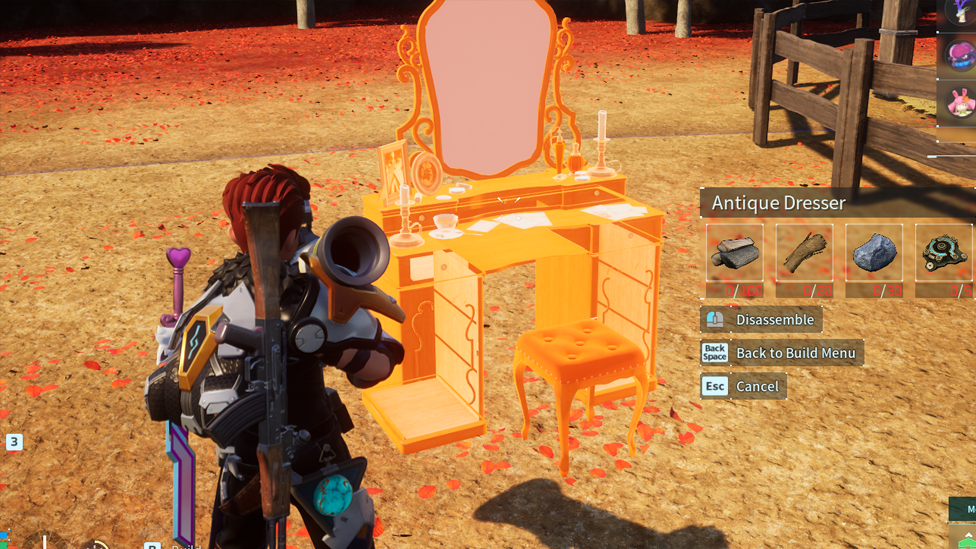
So, we’ve clarified why you might need to demolish or rebuild a structure in Palworld - but how do you actually go about this? Well, this is actually a pretty simple process! First of all, open Build Mode to begin working on your base. To do so, Press B on your keyboard (or “Up” on the D-pad, depending on your platform), which will bring up the familiar build wheel. Then, you can enter Disassembly Mode using the indicated button; on console, this will likely be the RS button. Once you’re in Disassembly Mode, you’ll notice that all dismantlable structures around you will be highlighted in orange. This makes it far easier to quickly and easily see which structures you can change and move around.
With your target structure highlighted, select the “Disassemble” button, which will disassemble the structure and refund the material costs of the building. This means that you can then reassemble the structure at any point with the materials you originally used! While this isn’t quite the same as an immediate move mode, it still allows you to quickly and easily move structures in your Palworld base. Of course, it can be a little time consuming, but it’s good to know that you won’t lose any materials by disassembling a structure and remaking it.
FAQs
Can I move buildings and structures in my Palworld base?
Technically, no. The only supported method to move items in your Palworld base is to use the dismantle and rebuild functions. Fortunately, you won’t lose any materials, so you can do this as many times as you need until you’ve found the perfect base layout!
Will I lose my materials when destroying structures in Palworld?
No! When destroying structures in Palworld, you’ll be refunded with all of the items that you originally used to build the structure. As such, you can destroy and rebuild as many times as you’d like!
How do I find Disassembly Mode in Palworld?
If you’re looking to disassemble structures in Palworld, you’ll first need to start from the Build mode; then, select the Disassembly Mode to destroy structures within your base.
Final Thoughts
Mastering how to destroy and move structures in Palworld is actually an incredibly simple process, and as such, when planning your new base, we strongly recommend keeping today’s tips in mind to help. After all, building, destroying, and reassembling structures is all incredibly simple, and better still, you’ll be refunded all of your materials each time you do! As such, there’s really no reason (well, other than a little hassle!) not to replan your base layout whenever the urge to redecorate and replan strikes. Just make sure you focus on practicality to ensure your new layout will serve your needs better than the previous design.