How to Use Auto-Crafting in Monster Hunter Wilds
In Monster Hunter Wilds, there are more materials than you can shake a Switch Axe at. From herbs and honey to ores, sacs, and monster drops, your inventory fills up fast—and fast decisions can make the difference between surviving a hunt and fainting out of the quest. While many of these items can be crafted into something useful, stopping mid-battle to open your crafting menu can be a dangerous game. That’s where auto-crafting comes in.
Auto-crafting in Monster Hunter Wilds is one of those underappreciated quality-of-life features that most hunters don’t take full advantage of until they realize they could’ve been crafting potions, antidotes, and even ammo automatically during combat. It’s a system designed to simplify your workflow, save time, and keep you focused on the fight instead of fumbling through menus. If you’re new to auto-crafting or just want a refresher, this guide breaks down how to turn it on and off, how it actually works in real-time, and why it can seriously improve your overall efficiency during your hunts.
What Is Auto-Crafting?
Make Your Own game Server
Auto-crafting in Monster Hunter Wilds allows you to automatically create specific items the moment you pick up the right ingredients. No manual crafting necessary, just scoop up the resource, and the game does the rest.
Let’s say you’re running through a zone and you snag a Herb. If you have auto-crafting enabled for Potion, and you already have Herbs + Empty Bottles, you’ll instantly craft a Potion without even thinking about it. The game will flash a quick notification in the corner of the screen, and you’ll be right back to the action. It works best for common utility items like:
- Potions
- Mega Potions
- Antidotes
- Ammo and coatings
- Buff powders
- Traps and tools (where applicable) You’ll still need to make sure your pouch has space for the crafted item, but the automation helps streamline your gameplay immensely.
How To Turn Auto-Crafting On & Off
Auto-crafting is customizable for each item. That means you can pick and choose which things you want the game to auto-craft. You might want to auto-craft Potions, but not use up your Honey unless you manually choose to make Mega Potions Here’s how to manage your settings:
- Open the Main Menu This can be done at any time when not in a cutscene or cinematic moment.
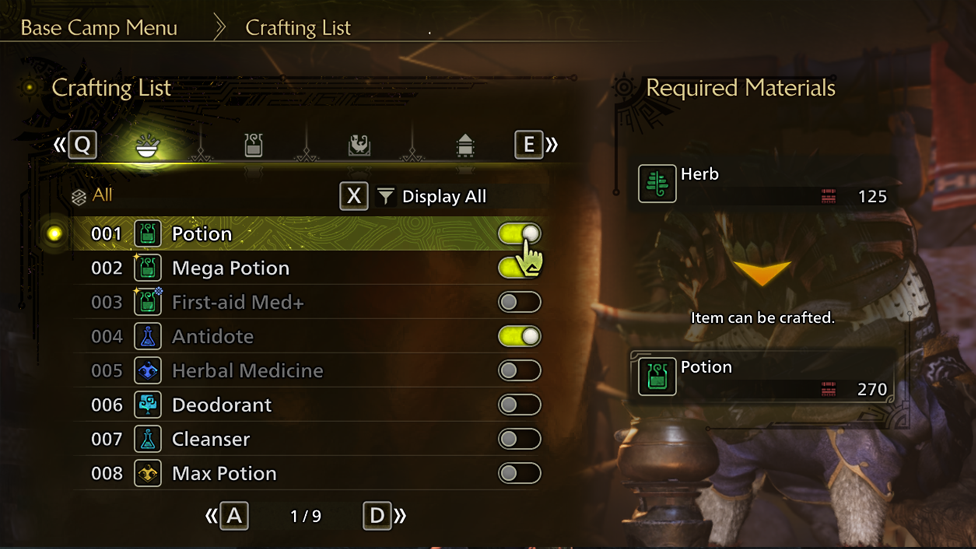
- Navigate to the Crafting List You’ll see a long list of all items you can craft—both ones you know and those you’ve partially discovered.
- Highlight the Item You Want Scroll through the list until you find the item you want to manage.
- Toggle Auto-Crafting On or Off
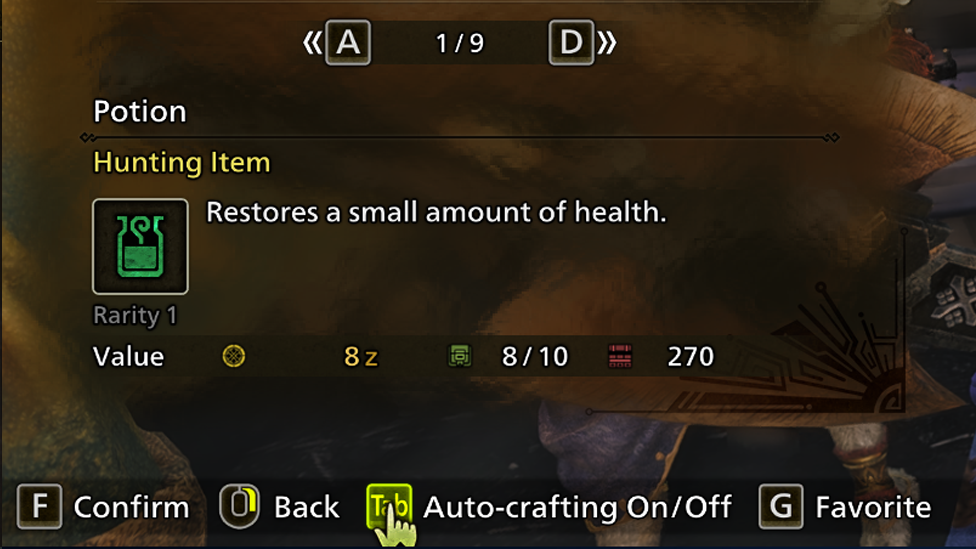
Press the following button depending on your platform:
- PlayStation: R3 (Right Stick Click)
- Xbox: Press Right Joystick
- PC: Tab
- When the toggle icon next to the item is green and pushed to the right, auto-crafting is ON.
- When it’s gray or pushed to the left, auto-crafting is OFF. There’s no global switch for turning off all auto-crafting, so if you want to stop auto-crafting completely, you’ll need to manually turn it off for every item.
How Auto-Crafting Works During Gameplay
Auto-crafting kicks in when you grab the second ingredient for a recipe, as long as you already have the first one. For example, if you’ve got a Potion and pick up Honey, the game will automatically craft a Mega Potion for you. It won’t trigger if both items are in your inventory but haven’t been collected yet, and it won’t make duplicates if your inventory’s full. You’ll need space for both the materials and the crafted item. When it happens, a quick notification will pop up to show you what got crafted.
Example Use-Case
Let’s say you’re in the middle of a heated battle and your health is dwindling. You’ve just run out of Potions but picked up an Herb. Since you’ve got Empty Bottles and auto-crafting for Potions is on, boom—you get a Potion without missing a beat. It’s a small convenience that can mean the difference between fainting and surviving.
Why You Should Be Using Auto-Crafting
There are a few key benefits to using auto-crafting consistently:
- Speed: No stopping the fight just to make a simple item.
- Convenience: Automatically stays stocked up on core items like Potions or Antidotes.
- Focus: Lets you stay in the zone without breaking flow to check your inventory.
- Safety: Especially helpful in multiplayer when pausing to craft could get you knocked out. The best time to set up your auto-crafting list is during downtime at camp or in between hunts. Set it once, and you’re good to go for the rest of your hunting sessions.
ScalaCube: Try Monster Hunter with Friends
Looking to hunt with friends without worrying about server hiccups or disconnects? Hosting your own Monster Hunter Wilds server through a platform like ScalaCube gives you more control over your multiplayer experience. You can tweak session settings, play with custom mods, and keep your squad together without relying on public lobbies.
ScalaCube offers user-friendly tools to set up and manage your own server, whether you’re a solo hunter inviting friends or part of a regular hunting party. With low latency, global access, and simple setup, it’s worth checking out if you want smoother co-op action.
FAQs
Can I auto-craft traps and bombs?
Not all traps or bombs support auto-crafting. Some high-level items still need to be made manually, especially if they use rare components. But basic bombs and tools may have auto-craft options.
Can auto-crafting use materials from my item box?
No. Auto-crafting only uses materials currently in your pouch. You’ll need to manually refill your items or visit a camp to access box contents.
What happens if I auto-craft something I didn’t want?
You can always turn off auto-crafting for that item. Also, remember the game only crafts when you pick up the second material, so you can control it by picking up the items in the right order.
Do monsters interrupt auto-crafting?
Auto-crafting doesn’t pause the game or trigger animations. It happens instantly and silently in the background. So, no interruptions or delays while you’re fighting.
Conclusion
Auto-crafting in Monster Hunter Wilds is a small feature that makes a big difference and having items auto-crafted can help you stay prepared, efficient, and focused on the hunt. It takes just a few minutes to customize your settings, and once you’ve done it, the game feels smoother and more responsive to your playstyle. So before your next hunt, take a look at your Crafting List and turn on auto-crafting for the essentials. It might just save your life.