How to Make Minecraft Harder
Make Your Own Minecraft Server
Your own Minecraft server is only 5 minutes away! We support simple one click install for over 3298 unique modpacks.
Minecraft Server Hosting
Minecraft is possibly the most versatile game on earth, with near-endless potential for exploration, creativity, and survival. While the vanilla game presents a tough challenge, a small number of players will need a tighter challenge. Either way, whether you are an old pro looking for something new or just a seasoned player who wishes to test their survival skills, there are a couple of ways to make Minecraft more challenging.
This guide will examine various methods, from altering in-game settings to inserting mods and plugins, to enhance gameplay and present a challenging experience in Minecraft.
Changing In-Game Settings
Make Your Own Minecraft Server
Your own Minecraft server is only 5 minutes away! We support simple one click install for over 3298 unique modpacks.
Start Your Minecraft Server Today!
Altering the in-game settings is the simplest method for increasing the difficulty in Minecraft without installing plug-ins or external mods. Minecraft has alternative difficulty options that can transform the behavior of mobs, resources, and environmental hazards.
-
Switch to Hard Mode: One of the easiest ways of making the game more difficult is to place it on "Hard" mode. You are able to make this switch in the options inside the game in the "Difficulty" window. Hostile mobs will spawn more frequently, and mobs will be more aggressive and deal more damage on Hard difficulty. There will be more spawning of hostile mobs, and hunger will regenerate as health loss. Your world will not regenerate its health automatically either, and the game will be tougher.
-
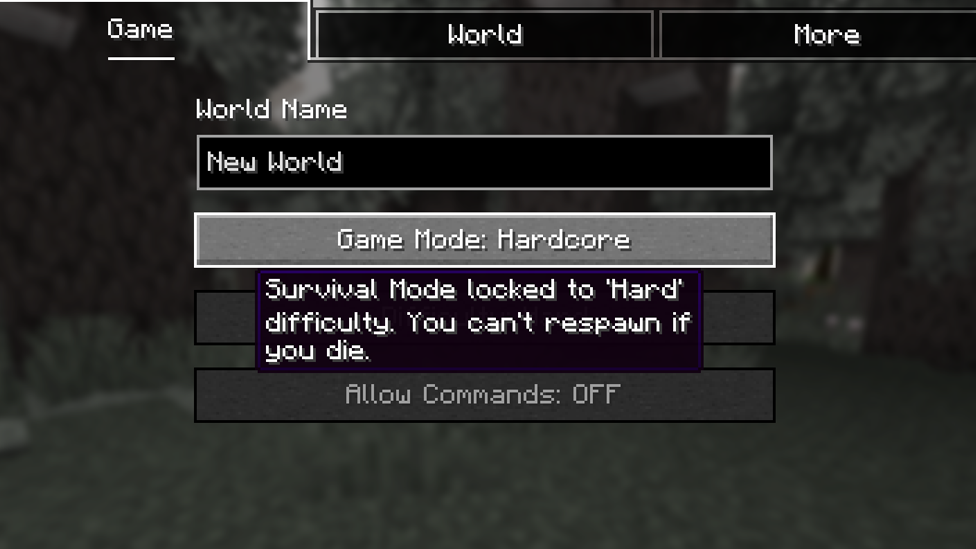
Enable Hardcore Mode: Hardcore mode is a step above Hard mode. In Hardcore mode, if you die, the world permanently gets wiped, so it is a risky test for players. Difficulty is still Hard, and you must manage all aspects of survival. Hardcore mode can be a good way to challenge yourself because it makes you take even greater care of what you do, what you choose, and what's around you.
-
Adjust Gamerules: Minecraft allows players to adjust game rules via commands. You can set gamerules to make the game harder in creative means. You can turn off natural regeneration, so you'll have to heal by using food or potions. You can turn off mob griefing or prevent players from sleeping in beds to avoid the night, so each night would be an additional risk. These changes can actually affect how you play the game and cause you to alter your strategy.
Adding Mods for Greater Challenge
While adjusting the in-game settings can make the game harder, mods offer much more control and variety. Mods can introduce new gameplay mechanics, tougher mobs, and challenges that are tailored to specific aspects of Minecraft. Below are a few notable mods to consider if you’re looking for a more difficult Minecraft experience.
-
Tough As Nails: This mod incorporates survival features such as temperature, thirst, and the need to monitor hydration. Players must maintain these new metrics while they play in the world, providing it with more realistic and challenging survival gameplay. It also provides disease that depletes players' metrics, taking away from them their survivability in hostile conditions.
-
RLCraft RLCraft has players think about the environment they're in and adapt to bad conditions. Renowned for making Minecraft one of the most challenging modpacks out there, RLCraft completely overhauls nearly all areas of the game. It has realistic survival elements such as thirst, heat, and the need for proper shelter. RLCraft also adds extremely difficult mobs and dragons to battle, requiring more strategy and planning for every battle. This modpack is perfect for those who wish to have a ruthless, realistic survival experience.
-
Apotheosis Apotheosis is a mod that focuses on enhancing the game’s enchantment system, introducing powerful new enchantments, bosses, and challenges. This mod increases the overall difficulty by making enchantments more complex, adding higher-level enchantments, and providing more powerful and unpredictable mobs. You’ll need to strategize your enchantments to survive the increasing challenges.
-
Survive: For an even more survival-hardcore experience, the "Survive" modpack introduces numerous survival challenges like shortages of food, harsher weather, and fewer resources. The mod increases the overall difficulty of Minecraft by introducing numerous new survival mechanics that cause every decision and action count.
Utilizing Plugins for Server Challenges
If you have a Minecraft server, plugins are a great way to change gameplay and add more challenging conditions. There are many available to add more difficulty to minecraft and can be installed simply on server platforms such as Bukkit or Spigot.
-
MythicMobs: This plugin enables you to make your own custom mobs with special capabilities, statistics, and loot. You are able to make your own custom boss or normal mobs that are potentially far more powerful than the vanilla mobs. MythicMobs raises the level of combat difficulty, as well as an air of uncertainty in that you don't know when a custom boss will appear with special ability and resistance to damage.
-
The Floor is Lava: This plugin raises the lava level every now and then in your server world, and players must learn in a hurry or be burned to death. The plugin introduces yet another factor of risk because players must always be on the move and building, and it is getting more challenging to locate hiding places. It's exciting and random danger that keeps everyone on their toes.
-
Multiverse: The Multiverse plugin allows you to have multiple worlds of different difficulty levels. This is fantastic if you want to create special, difficult environments or worlds for different kinds of gameplay. You can have a world be a serene paradise and another a terror survival situation, providing different ways of challenging players depending on what they like.
-
MobArena For battle-hardened players, the MobArena plugin constructs battle arenas composed of mobs of increasing difficulty. Players can team up and fight waves of hostile mobs to test their strength and coordination against. Difficulty and rewards of the mobs can be set to one's choice, and hence it is an excellent plugin for multiplayer servers seeking to offer a more challenging PvE experience.
Adding Custom Challenges
If you'd rather make Minecraft more difficult without using mods or plugins, you can challenge yourself with your own rules and restrictions. These challenges make you think outside the box and adjust to the environment.
-
No Sleeping: By disallowing beds to skip the night, you make all nights an adventure. Mobs will spawn and fight, and you'll need to be vigilant and plan your actions beforehand. No use of beds enhances survival in the open world and gives a sense of tension whenever the sun sets.
-
Limited Resources: Another challenge is limiting the materials you can work with. Suppose you decide not to use iron or diamond tools or restrict yourself to building with only wooden resources. That makes crafting, building, and survival more difficult and forces you to have to think outside the box and be resourceful.
-
Permadeath For the last challenge, employ a permadeath rule where any death results in the permanent removal of your world or character. This high-stakes rule gets players to think extremely hard about each action they make, as one misstep could result in the loss of everything they have worked for.
Scalacube: The Perfect Server Hosting for Difficult Minecraft
If you want to play with friends and indulge in your new demanding Minecraft experience, Scalacube is the ideal server hosting solution. They offer high-performance and reliable hosting with extremely low lag and full support for mods and plugins. If you are hosting a modded server like RLCraft, custom plugins to implement added difficulty, or you simply desire a solid multiplayer setup, Scalacube provides seamless hosting services.
Scalacube servers run 24/7, so your world is always there, and instant install is quick and easy to get started playing. Their easy control panel means you can manage server configuration, backups, and more with ease. With Scalacube, you can play Minecraft securely, protected from server crashes and technical issues, giving you more time to concentrate on the challenging gameplay.
Conclusion
Hardening Minecraft is a rewarding way of pushing your survival ability, creativity, and trouble-solving skills. If you're modifying the difficulty levels, installing challenging mods and plugins, or creating personal challenges, there are some methods by which you can increase the level of play. Scalacube's reliable and flexible hosting options allow you to play these raised challenges with friends, providing you with a lag-free and interruption-free multiplayer session.
So why not push your Minecraft adventure to the next level? Rise to the challenge, and let Scalacube help you create your next survival story one to remember.
Make Your Own Minecraft Server
Your own Minecraft server is only 5 minutes away! We support simple one click install for over 3298 unique modpacks.
Start Your Minecraft Server Today!