Scrap Mechanics Paint Ammo
Creativity knows no bounds in Scrap Mechanic. Among the many tools at a player's disposal, the Paint Tool makes itself known, allowing mechanics to add color and distinctiveness to their creations. The Paint Ammo in Scrap Mechanics is the consumable resource that powers the painting process and is central to how this tool works. In this Paint Ammo guide, we'll detail all things Paint Ammo and how to get a handle on Paint Ammo acquisition, crafting, and usage.
What is Paint Ammo used for in scrap mechanics?
Make Your Own Scrap Mechanic Server
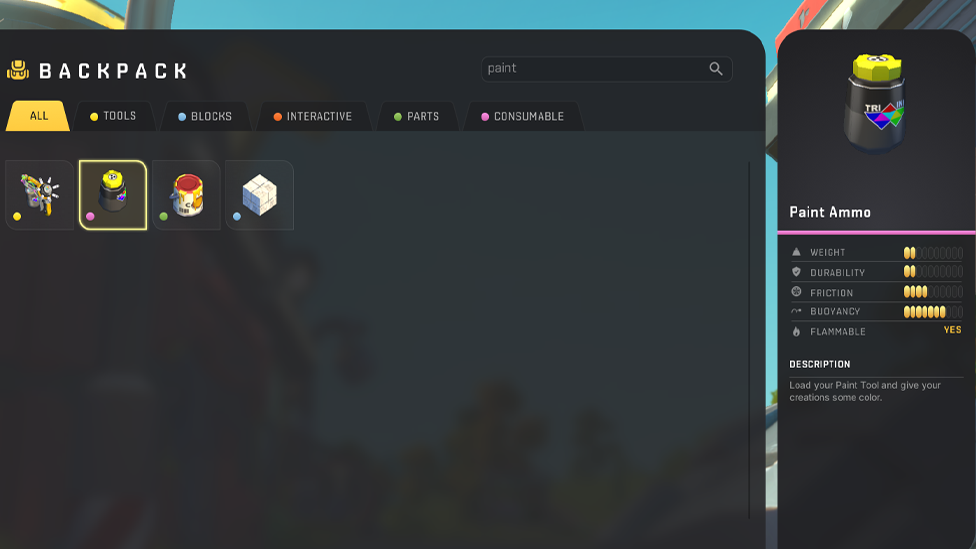
Paint Ammo is the Paint Tool's lifeblood in Scrap Mechanic. If it is not there, the tool is not alive and cannot use vibrant hues to live our creations. Paint Ammo units are one-to-one with painting actions and can be used to color a single block or multiple blocks at once. This underscores the direct correlation between having Paint Ammo and maintaining creative expression.
Acquiring Paint Ammo
In the expansive realms of Scrap Mechanic, Paint Ammo can be procured through various means: Looting: Adventuresome mechanics can find paint ammo in Damaged Crates and ruined chests around the world. This valuable resource is kept in warehouses, lockers, and file cabinets. Crafting: If you like to do things yourself, crafting Paint Ammo is an option. Players can use Pigment Flowers to make Paint Ammo with the Craftbot. For example, five Pigment Flowers are required to make five units of Paint Ammo with a crafting time of about 15 seconds or 9 seconds with a Level 5 Craftbot.
The Role of Pigment Flowers
Paint Ammo production is based on Pigment Flowers. They are scattered all over the game environment, and each color variant is in the mix to build a rich palette of colors. These flowers are harvested to craft Paint Ammo and allow players to try their hand at many different colors to create their constructs.
Crafting the Paint Tool in Scrap Mechanics
Before painting something in Scrap Mechanics, one should have the Paint Tool. To craft this essential instrument, you will need Metal Block 1, Glass Block, and Component Kits. When assembled, however, the Paint Tool becomes a new tool in the mechanic's creative arsenal as long as they have Paint Ammo and they can use this tool to apply colors.

Utilizing the Paint Tool in Scrap Mechanics
Operating the Paint Tool is an intuitive process: Painting: Scrap Mechanic Players can apply the selected color to selected blocks by pressing their left mouse button. You can also paint multiple blocks in a row by holding and dragging the mouse. Color Removal: Use the right mouse button to remove color from painted objects and restore them to their original state. Color Selection: Pressing the 'Q' key opens the color selection interface, showing a palette of base colors and their tints and shades. This feature allows users to customize creations with precision.
Strategic Paint Ammo Application
While the allure of painting every creation is strong, prudent management of Paint Ammo is essential: Resource Management: As each painting action consumes one unit of Paint Ammo, it is best to design ahead; otherwise, you'll needlessly waste Ammo. Efficient Crafting: By regularly harvesting Pigment Flowers and keeping a stockpile, you always have Paint Ammo on hand, meaning you don't go dry mid-project. Prioritization: Paint only the key elements of your creation that add functionality or aesthetics, and do not waste paint on less-impact areas.
Enhancing Scrap Mechanic Gameplay with Color
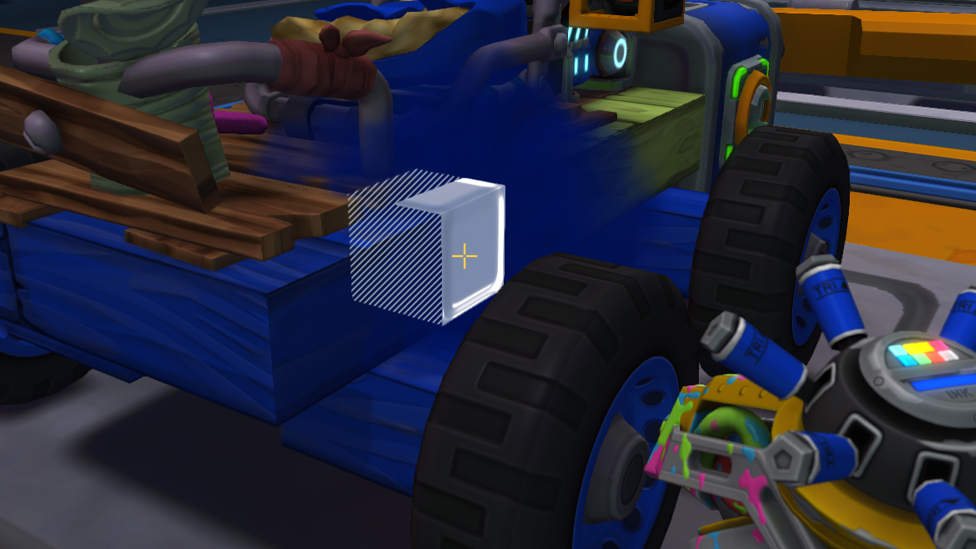
The integration of color transcends mere aesthetics in Scrap Mechanic: Functional Indicators: Use colors to distinguish between different sections or functionalities of complex machines, making organization and operation easier. Team Identification: In Scrap Mechanics multiplayer situations, teams or collaborators can be distinguished by different color schemes to convey a feeling of belonging. Visual Appeal: A thoughtfully chosen color palette can transform a boring structure into a stunning masterpiece, elevating the gaming experience.
FAQs
How do you get Paint Ammo in Scrap Mechanic?
Damaged Crates, Ruin Chests, Lockers, and File Cabinets in Warehouses will drop Paint Ammo. It can also be crafted using Pigment Flowers with a Craftbot.
What do I need to craft Paint Ammo?
Pigment Flowers are needed to make Paint Ammo. Five units of Paint Ammo are produced when crafting five Pigment Flowers in the Craftbot.
What is the use of the Paint Tool in Scrap Mechanic?
The Paint Tool allows a player to paint or unpaint colors on blocks. This paints with the left mouse button, removes color with the right, and opens the color selection interface with the 'Q' key. Each action consumes one unit of Paint Ammo.
Why do we need Paint Ammo in the Scrap Mechanic?
Paint Ammo is required to use the Paint Tool, which allows you to color up your creations, boosting the game's aesthetics, functionality, and organization.
Conclusion
The Paint Tool and Paint Ammo in Scrap Mechanic bridge engineering and creativity, allowing you to turn functional builds into personal masterpieces. Paint Ammo fuelled this artistic process, providing bright designs that add visual appeal, differentiate components, or create a unique identifier for the team. Learning to use it leads to infinite creative possibilities, taking the game's inventive potential to the next level. Scalacube provides reliable and affordable Scrap Mechanic MP server hosting so players can join multiplayer adventures without problems. Scalacube is easy to set up, provides high-performance servers, and offers 24/7 support so creative mechanics can collaborate and explore game possibilities together with an optimized gaming experience. To improve multiplayer gameplay, visit Scalacube!