Scrap Mechanic Lift
Scrap Mechanic is a creative sandbox game where players can build, design, and engineer almost anything. The Lift in Scrap Mechanic is one of the game's most indispensable tools, a multipurpose platform that makes construction and troubleshooting much easier. This guide will elaborate on the Lift's capabilities, applications, and more advanced uses for beginners and experienced builders.
Introduction to Scrap Mechanic Lift
Make Your Own Scrap Mechanic Server
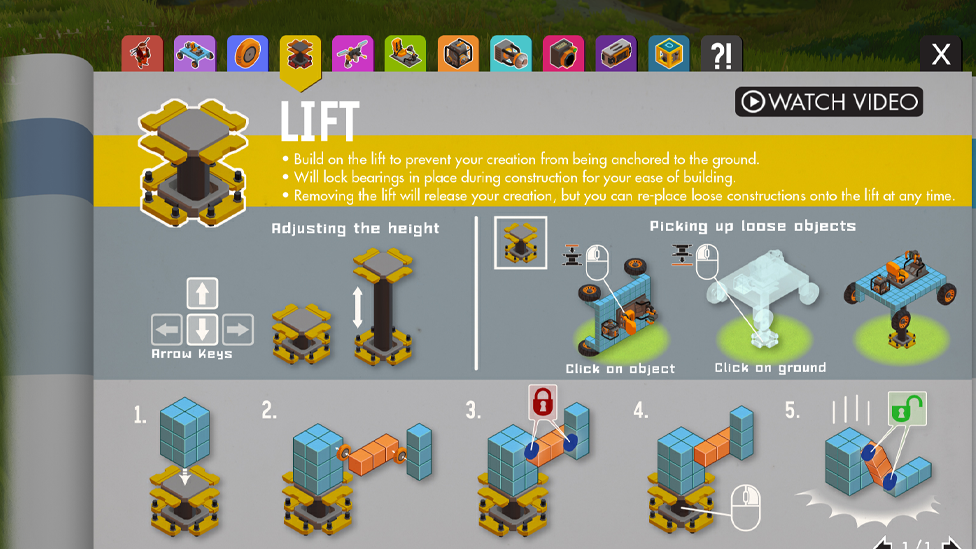
The Lift is a fundamental tool in Scrap Mechanic that assists players in building and adjusting vehicles, machinery, and structures towering in the sky. It is available in both Creative Mode and Survival Mode and is a must-have for anyone wanting to be precise and efficient with their builds. The player's inventory already has it automatically, and it's meant to be important from the start. Lift in Scrap Mechanic provides a stable platform on which players can adjust the height and position of their constructions. This capability allows the addition of components such as wheels, suspension systems, and all the mechanical components. Lift, or the coil, is the linchpin of a successful creation, whether a rudimentary buggy or a sophisticated robot.
How the Lift Works in Scrap Mechanic
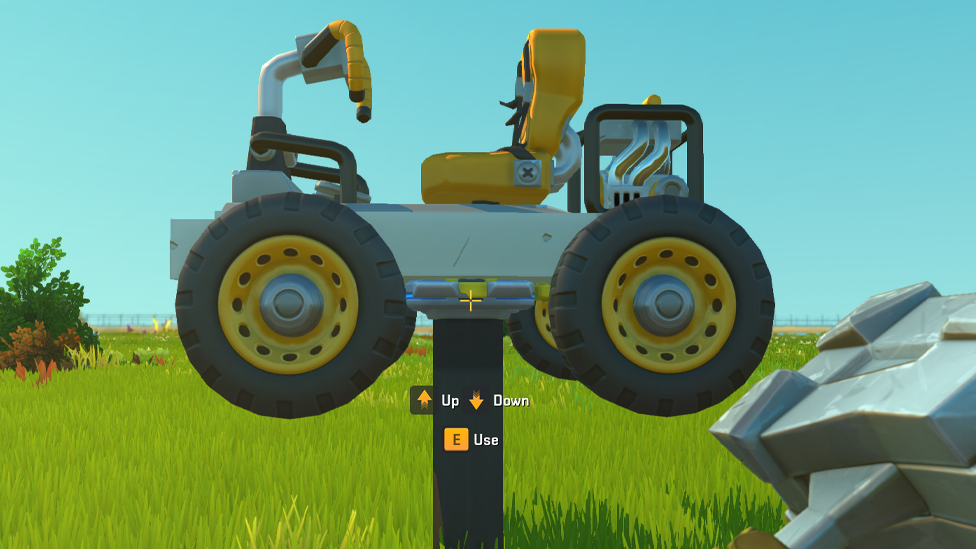
The principle on which Lift operates is simple and effective. When you put it on the ground, it's a foundation for Scrap mechanic players to build on. After an object is mounted, the Lift can be raised or lowered using directional controls. This is particularly useful for reaching hard-to-get areas under vehicles or to inspect large designs from multiple angles. The Lift can reset its orientation after it tips over or gets stuck so it can function again. Maneuvering complex structures is invaluable in Scrap mechanics gameplay, but sometimes you must correct a mistake or two so it doesn't bite you at the end.
Building Things in Scrap Mechanic with the Lift
The Lift is a foundational tool in almost every aspect of building. In Scrap Mechanic's Creative Mode, where all materials and resources are unlimited, the Lift offers a blank canvas to experiment with designs. In Survival Mode, it plays an equal role, aiding players in crafting vehicles and defenses and monitoring the resource budget. To begin using the Lift for construction, players should: Place the Lift in Scrap mechanics on a flat ground for stability. Mount the Lift on top of the framework of the desired build. Then, add some essential components, like wheels, bearings, engines, and suspensions. Test the build by lowering the Lift and make sure everything works nicely. The Lift's adjustable base eliminates the need to align parts and maintain balance during assembly. Scrap mechanic players can also easily iterate on their designs, adding or removing features as needed.
Advanced Uses of the Lift
The Lift does more than just function; it opens up the possibilities of advanced engineering in Scrap mechanics. The Lift has become a staple for players to integrate into their creative projects, which tend to challenge Scrap Mechanic's limits. Some popular applications include: Resetting Complex Machinery: The Lift provides a stable way to reset configuration for builds with moving parts so that mechanisms operate as expected. Creating Multi-Level Elevators: In Scrap Mechanic's Survival Mode, players can pair the Lift with logic gates, sensors, and controllers to create fully operational elevators perfectly suited for multi-story bases. Constructing Themed Challenges: The Lift's precision and versatility are favorites for designing fun gameplay experiences in Scrap mechanics, from mazes to obstacle courses.
Troubleshooting Common Issues
The Lift is rather easy for new players, but with large or asymmetrical creations, there are some challenges. When a build becomes unstable or collapses, it is often due to inadequate weight distribution or excessive size. To mitigate these issues: Make sure the base of the construction is even. Wherever possible, use lighter materials to minimize the strain on the Lift. You break down bigger projects into smaller bits that are easier to handle. If everything seems okay and the Lift still doesn't lift, there could be glitches or something blocking it, in which case you might want to remove it and place it again. These problems will often be fixed by repositioning the Lift or resetting the game environment.
Optimal Use Tips and Tricks
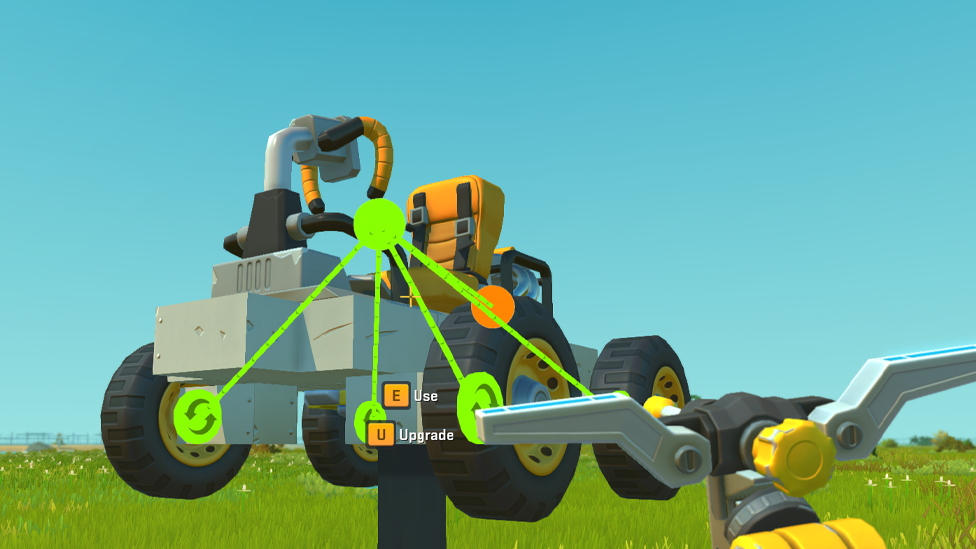
Some strategic thinking is needed to maximize the Lift's potential. Here are a few key tips for enhancing your gameplay: Pair with the Connection Tool: Players can test mechanisms with the build still on the Lift, guaranteeing that engines and bearings will be configured correctly. Prioritize Balance: Symmetry and lightweight materials allow for a smoother operation during construction. Test Frequently: Regularly testing designs in stages allows flaws to be found earlier, saving time in the long term.
FAQs
What is the primary function of the Lift in Scrap Mechanic?
Lift elevates objects and creates a stable platform to build, inspect, or modify creations.
Can you use the Lift in Survival Mode?
The Lift is important in Survival Mode, especially for crafting vehicles and repairing machines in resource-poor settings.
How do you create an elevator with the Lift?
Using the Lift with sensors, controllers, and logic gates, you can design elevators for efficient vertical transportation in bases or towers.
What should you do if the Lift doesn't work properly?
Make sure your build is balanced and has no obstructions. If the problems persist, then reposition the Lift or reset its placement.
Conclusion
Scrap Mechanic's Lift is more than just a hammer to add two blocks; it's the key to creativity and invention. Scrap mechanic players can easily and confidently deal with ambitious projects by learning this tool's basic and advanced uses. Whether you are building for fun or practical use, survival or just for fun, the Lift is an essential tool in every mechanic's toolbox. Get the best Scrap Mechanic server hosting with Scalacube. With their Scrap Mechanic server hosting, you can enjoy smooth, lag-free multiplayer gameplay and play and build with friends.