Scrap Mechanic Connect Tool
Scrap Mechanic Connect Tool is the core utility that gives power to the players to connect, automate, and control the interactive components in their creative build in this innovative sandbox game. The Connect Tool is crucial to the player's ability to render concepts and translate them into functional designs, from vehicles to complex gadgets. In this guide we dive deep into its functions, uses and advanced applications to ensure that players of all skill levels can begin to unlock its full potential.
Understanding the Connect Tool
Make Your Own Scrap Mechanic Server
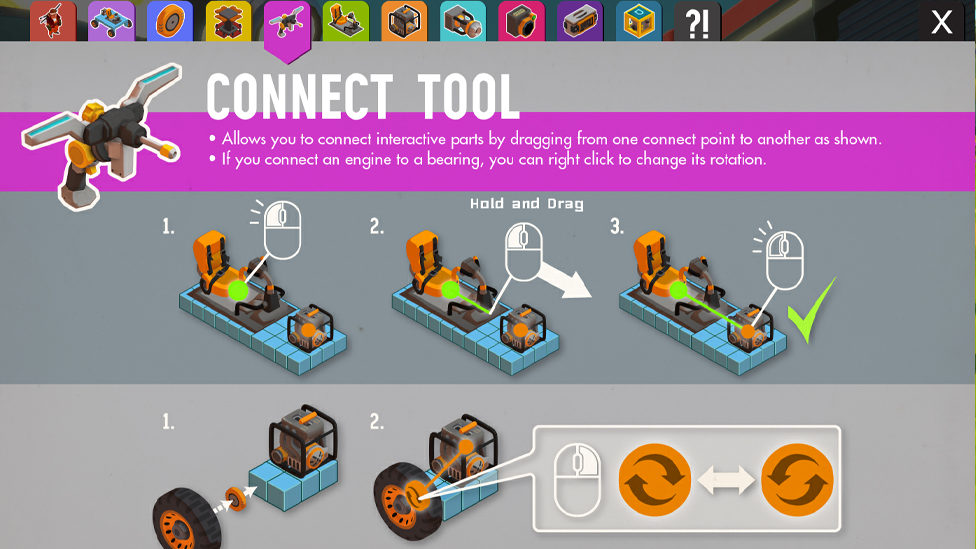
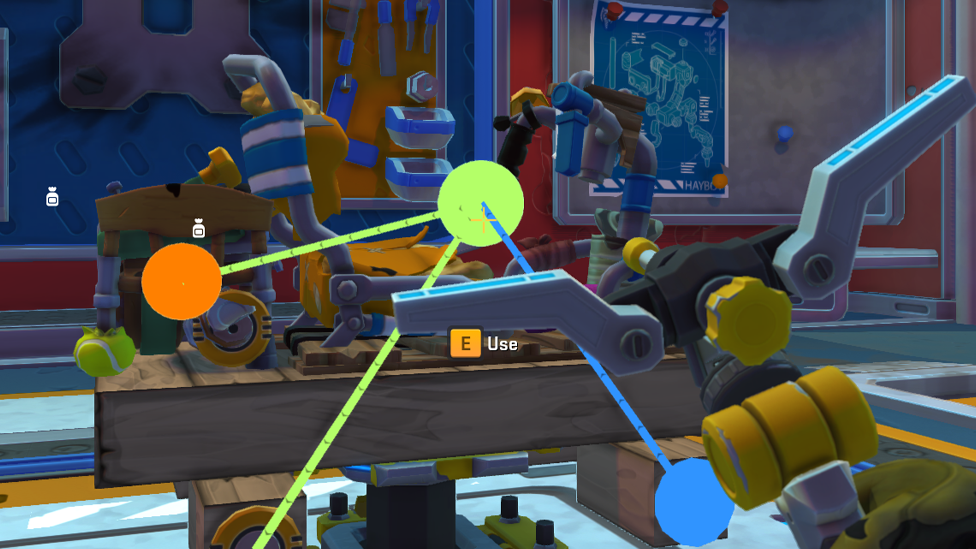
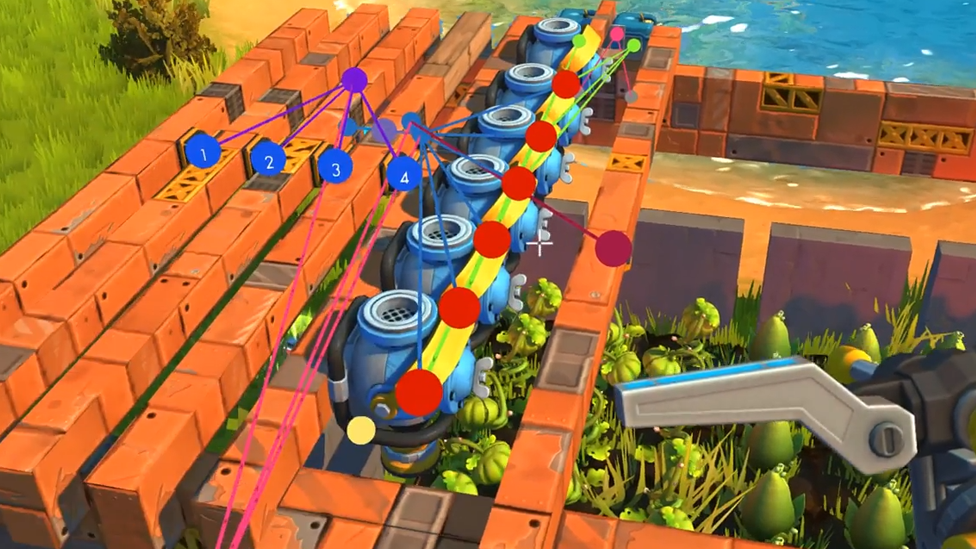
At its core, the Connect Tool in Scrap Mechanics is a device that connects several of Scrap Mechanics's components. When the tool is equipped, it shows visible connection points, or "nodes," on interactable items such as engines, controllers, switches, and sensors. When connections are formed, these nodes are highlighted with color-coded lines, making it easier to visualize and troubleshoot setups. The tool's user-friendly interface simplifies the connection process. To create a link, you click on the node of one component and drag the connection to another compatible part.
Applications of the Connect Tool
Thanks to its versatility, Scrap Mechanic's Connect Tool is perfect for creating many types of machines and mechanisms. Its applications range from simple builds to complex automated systems: Vehicle Creation: Players in Scrap Mechanics can build fully operational cars by linking a driver's seat to an engine and connecting the engine to wheels with bearings. The engine provides movement, and the bearings provide rotational motion. The Connect Tool makes sure that these parts work together and perform as a vehicle is supposed to. Automation of Doors and Shutters: The Connect Tool is crucial for automated systems like doors that open with a push of a button or a sensor. It links switches to controllers and controllers to mechanical pieces, such as bearings, and programs them to play out explicit undertakings when enacted. This is particularly useful for building automated homes or secured bases. Interactive Contraptions: Players can create real-time systems that react to environmental triggers. For example, you can hook up a sensor to a light and wire it to turn on automatically when someone enters a room with the Connect Tool. Complex Movement Sequences: When using controllers, movement patterns can become very intricate. The linchpin for coordination is the Connect Tool, whether animating a robotic arm or synchronizing multiple parts for a choreographed motion.
Advanced Features and Functionalities
The Connect Tool in Scrap Mechanics offers several advanced features that cater to experienced players looking to create intricate mechanisms: Controller Integration: In addition to making a dynamically scaled aircraft possible, controllers are advanced interactive components that manage sequences of motion for connected bearings and pistons. The Connect Tool allows you to connect multiple bearings to a controller, each with custom rotations or motions. Players can set angles and sequences in the controller's interface to synchronize the motion of machinery or vehicles. Sensor and Trigger Systems: Connecting sensors to different components can create automated responses. For example, a door can be made to open when a sensor senses movement, adding realism and convenience to a build. The Connect Tool guarantees correct connections between sensors, controllers, and the components they control. Customization with Right-Click: The Connect Tool allows players to adjust certain settings by right-clicking on connected components. For instance, you cannot create proper steering mechanisms in vehicles without reversing the rotation of a bearing. This feature makes the Scrap Mechanics gameplay deeper, as players must tune the configuration for maximum performance. Multi-Component Linking: The Connect tool supports multiple connections per component and upgrades to devices such as controllers or engines do not restrict them. For advanced users, systems with multiple moving parts, such as cranes, elevators, or transforming vehicles, can be designed.
Challenges and Solutions
While the Connect Tool is a powerful asset, mastering it comes with challenges: Connection Limitations: A fixed number of connections exists to basic engines and controllers. Players must upgrade these components using resources such as Component Kits to increase their capabilities. For example, upgrading a controller means you can handle more bearings or pistons and, therefore, build larger and more complex systems. Wire Clutter: The abundance of wires in intricate builds can tend to overwhelm the eyes. To fix this, players should approach this in an organized manner, logically planning connections and using color-coded lines as guides to decrease confusion. Trial and Error: Experimentation is usually needed when crafting functional systems. This can be quite a struggle for beginners, and if your designs aren't working out the way you intend, you might be faced with setbacks. The tool is only mastered through persistence and incremental testing.
Tips for Effective Use
New players should begin with simple projects. They can familiarize themselves with the Connect Tool's functionality by building a basic car or automating a single door. They can gradually take on more ambitious builds, such as automated factories or complex vehicles. The color-coded lines and checking connections often help to achieve accuracy and functionality. For advanced builders, the sky's the limit for what they can do with sensors, switches, and controllers. However, to combine multiple components into cohesive systems, planning, creativity, and some knowledge of how they work together are needed.
FAQs
What is the Connect Tool used for in Scrap Mechanic?
The Connect Tool links interactable components that can be used to automate systems, power vehicles, and create dynamic machinery.
How do you use the Connect Tool?
When the tool is equipped, the user clicks on the connection node of one component, drags it to the other, and releases it to create a connection.
Can you upgrade the Connect Tool?
You can't upgrade the tool but can upgrade things like its controllers and engines to allow more connections and functionality.
What are some advanced uses of the Connect Tool?
Possible advanced uses include programming motion sequences with controllers, automating systems with sensors, and designing synchronized mechanisms.
Conclusion
The Scrap Mechanic Connect Tool is not just a tool, it is the link between Creativity and Functionality in Scrap Mechanic. Learning its mechanics, players can turn basic builds into intricate masterpieces. The tool is versatile enough, from constructing vehicles to automated systems. For both the beginner experimenting with simple contraptions, or the advanced builder creating complex machinery, the Connect Tool is your ticket to success in Scrap Mechanic's whimsical universe. Scalacube hosting services help you enhance your multiplayer experience. Scalacube is designed to provide smooth Scrap Mechanic mp gameplay with collaborative creations for reliable performance.