How to Use Global Palbox in Palworld
The Global Palbox is an incredibly useful feature in Palworld, but one that’s all too often overlooked. Still, knowing how to use the Global Palbox could potentially transform the way you play the game - and so, today, we’re exploring what the Global Palbox is, how to use it, and why you might want to use the Global Palbox in Palworld. Hopefully, this will allow you to make the most of the Global Palbox system in Palworld in your own game.
What Is the Global Palbox?

Make Your Own Palworld Server
Before we go any further, we should start by considering what the Global Palbox actually is. Simply put, the Global Palbox is a special structure that makes it possible to transfer Pals between different saves of your Palworld game, thus allowing players to send Pals from one playthrough to another. Definitely helpful if you’ve been looking to start up a new game, such as launching a Palworld multiplayer session with your friends, but don’t want to lose all of the progress you made on your Paldeck in a previous save.
Of course, if you do decide to go down this route, though, it’s not only losing your Pals that should be a concern; the security of your game also needs to be a priority! Luckily, with a professional private server, you can stay confident that your Palworld multiplayer game will be secure thanks to full DDoS protection, along with plenty of other great benefits that help make your game a little smoother and safer. The Global Palbox allows players - once crafted - to store DNA from your favourite Pals here, then summon copies in any world that allows Global Palbox use. This makes it a very powerful tool because it doesn’t permanently transfer your Pal, so you can keep the original in its home world and simply replicate it elsewhere. However, keep in mind that the DNA capturing process effectively takes a snapshot of the Pal at the time; as such, if your Pal levels up in the original server, the extracted DNA used in the Global Palbox won’t keep pace. So, if your Pal has improved in your main game, you’ll need to extract DNA again in order to transfer it in its current form to your new save.
How to Craft the Global Palbox

Before you can transfer Pals between saves, you’ll need to craft the Global Palbox; fortunately, this isn’t too complex of a recipe, only requiring three Paldium Fragments, five wood, and fifteen pieces of stone. While the recipe itself is pretty simple, though, don’t overlook the size of the Global Palbox, as it’s far bigger than a regular Palbox in terms of space requirements. If your camp is pretty packed already, you may need to reshuffle things around to fit your Global Palbox in.
Using the Global Palbox to Transfer Pals Between Worlds
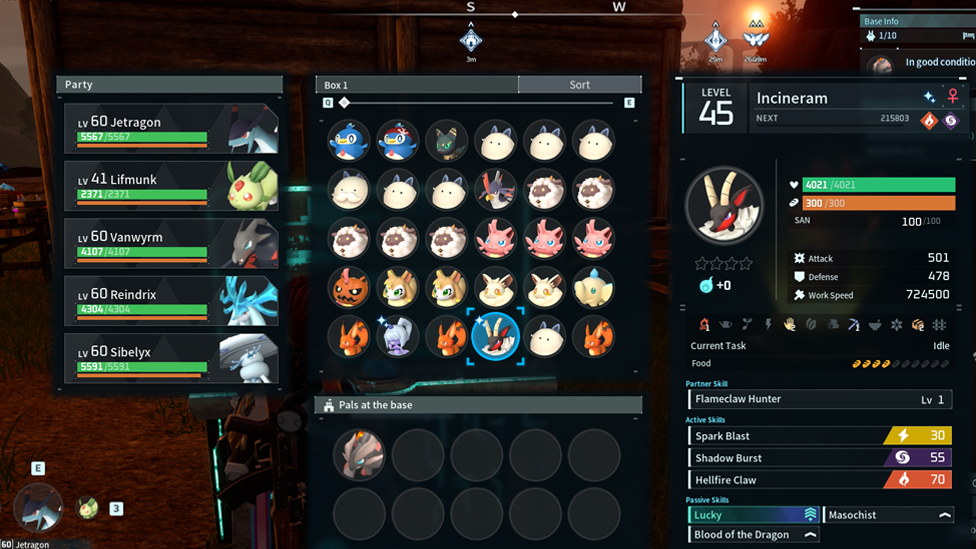
So, we’ve clarified how to make the Global Palbox, but how do you actually use it to transfer Pals between game saves? It can sound pretty complex when we start talking about DNA saving and so on, but in reality, it’s a very easy process - so don’t give up too early! First, you’ll need to store your Pal’s genetic data, or DNA, in the Global Palbox. This is simply done by dragging a Pal from your Palbox into the Global Palbox, which will automatically generate a copy of its DNA. This doesn’t delete the original Pal, so you can still use it in this world - but remember: any improvements it makes will not be saved in its DNA! With your Pal’s DNA saved in your original playthrough, you can then exit to the main menu and load another save—this can be a brand‑new world or one you’ve already started. Build a Global Palbox in that world and open it; this will then allow you to transfer the stored Pal DNA by dragging it over into your main Palbox.
This method effectively “imports” your favourite Pal without requiring breeding or leveling up all over again. Plus, there’s no limit on how much you can do this, so any improvements you make to your Pal in the new save can then be transferred back to the previous save if you so wish. It’s important to note though that there are a few rules to help prevent this system from being too overpowered. For example, you cannot have a duplicate within the same world; in other words, if you bring a Pal back over again (e.g., if you levelled it up on a different save), it will overwrite the existing version or cancel the transfer entirely.
Overall, the Global Palbox is a reat way to save time and allows you to keep building momentum rather than hitting that re-grind wall when starting a new save. It also makes playing on multiple saves feel much more rewarding, rather than each being an entirely self-contained existence.
FAQs
Can I import the same Pal multiple times using the Global Palbox?
No. The same Pal can only be imported into your game once, even if you took a new DNA save. Any re-imports will overwrite the existing “version” of the Pal that’s active in your game.
Do I need to craft the Global Palbox in both games to use it?
Yes. You’ll need a Global Palbox in both the sending and the recipient save files in order to transfer Pals successfully with it. Keep in mind that the Global Palbox is only for transferring between your own save files, too, not with friends.
Final Thoughts
The Global Palbox is an incredibly handy feature in Palworld that massively enhances flexibility and makes playing on multiple saves much more rewarding in many cases. Nevertheless, it’s important to be careful not to accidentally overwrite an existing Pal by trying to bring in a duplicate! So, always take care when importing and exporting Pals to ensure you’re bringing in the right Pal for your game’s specific needs.