How To Customize Radial Menu In Monster Hunter Wilds
Monster Hunter Wilds is a wild ride, especially when you’re face-tanking roars and desperately mashing buttons for a potion. The last thing you want is to scroll through six pages of your item pouch while a 3-ton wyvern is air-dropping pain. That’s where the Monster Hunter Wilds Radial Menu steps in to save your hunter hide. This circular slice of heaven lets you assign quick-use items, crafting shortcuts, and even game functions—because nobody has time to fumble through menus mid-battle. Let's break it down.
How to Customize the Radial Menu (Step-by-step)
Make Your Own game Server
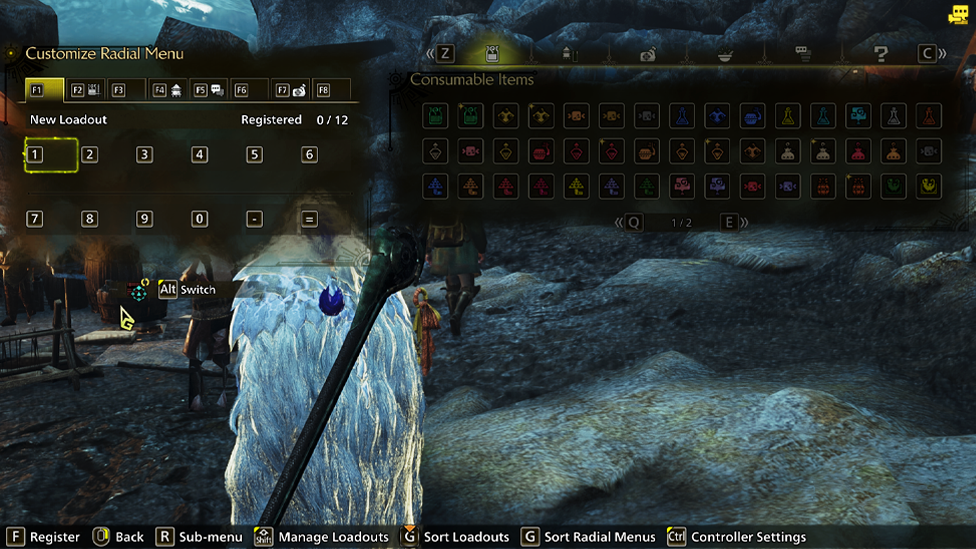
Customizing Radial Menu Monster Hunter Wilds is super straightforward, and you can do it whenever you feel like streamlining your chaos. Here’s how:
- Open the Start Menu and head to the Items & Equipment tab (that’s the one chillin’ all the way to the left).
- Select Customize Radial Menu.
- Now hold down Right Stick (PlayStation/Xbox) or CTRL (PC) to open the controller settings.
- Choose the Radial Menu Shortcut you want to edit—or create a brand new one if you’re feeling spicy.
- Use Left Stick (console) or your mouse (PC) to pick a slot on the Radial Menu wheel.
- Press X (PS5) / A (Xbox) / LMB (PC) to assign an item to that slot.
- Use L2/R2 (PlayStation), LT/RT (Xbox), or Z/C (PC) to shuffle through tabs and find your item of choice.
- Repeat until your Radial Menu looks like something a true hunting god would use. Bonus tip for PC hunters: You can also edit Radial Menus by typing in changes directly via the Customize Radial Menu menu.
Radial Menu Loadouts: Because One Setup Ain’t Enough
Here’s where it gets fancy. You get 36 MH Wilds Radial Menu loadouts. That’s right—36 different wheels of quick-access joy. You can register and save individual setups, and they’ll stick around for whenever you need them. Just a heads-up though: Monster Hunter Wilds Radial Menu Loadouts are separate from your Item Pouch Loadouts, so you’ve got double the power to fine-tune your hunts.
Crafting on the Fly (Yes, Seriously)
Sometimes, you don’t need a potion—you need more potions. That’s where crafting through the Monster Hunter Wilds Radial Menu becomes a game-changer.
- Open your Radial Menu customization.
- Go to the Crafting List tab on the right.
- Pick a recipe and decide:
- Use "One by One" to craft a single item.
- Use "All" to convert all your materials into the item.
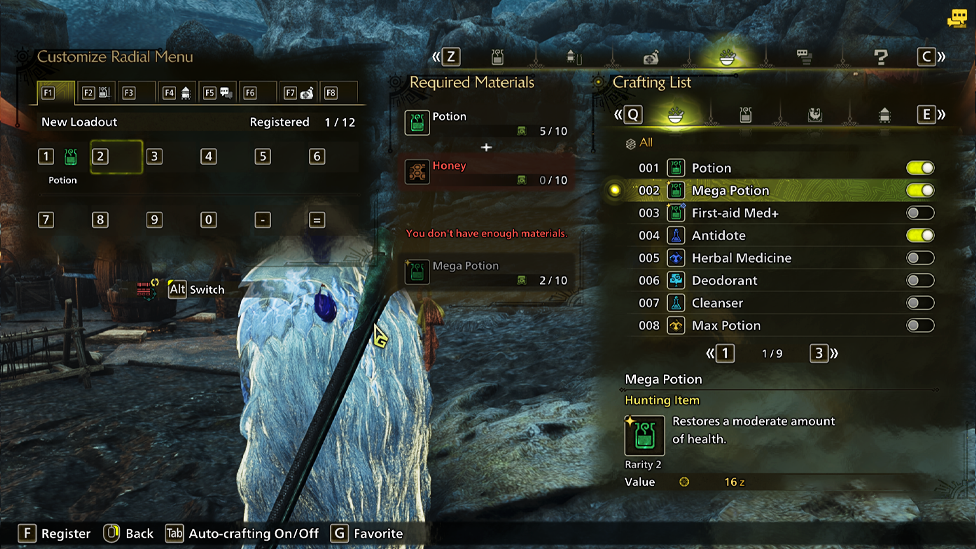
Need Mega Potions fast? Done. Running low on Tranq Bombs? Boom, crafted. It’s that easy. For Keyboard Warriors: The Item Bar If you’re rolling with a keyboard and mouse, you might prefer the Item Bar over the Monster Hunter Wilds Radial Menu. It uses the number keys instead of the radial wheel and is way more intuitive if you’re used to playing shooters or MMOs. It still shares loadouts with the Monster Hunter Wilds Radial Menu, so feel free to swap between the two depending on how you’re feeling.
Using the Radial Menu Like a Pro
Once you’ve got everything set up, using the Radial Menu in real-time is a breeze:
- Hold down L1 (PlayStation) / LT (Xbox) / CTRL (PC) to bring up your active wheel.
- Flick the Right Stick (or click with LMB on PC) to choose your item.
- Switch Radials on the fly with the D-Pad (console) or F1–F8 (PC). You can even throw on emblems/icons for different Radials so you don’t accidentally toss a steak when you meant to drop a Shock Trap.
Best Items to Put on Your Radial Menu
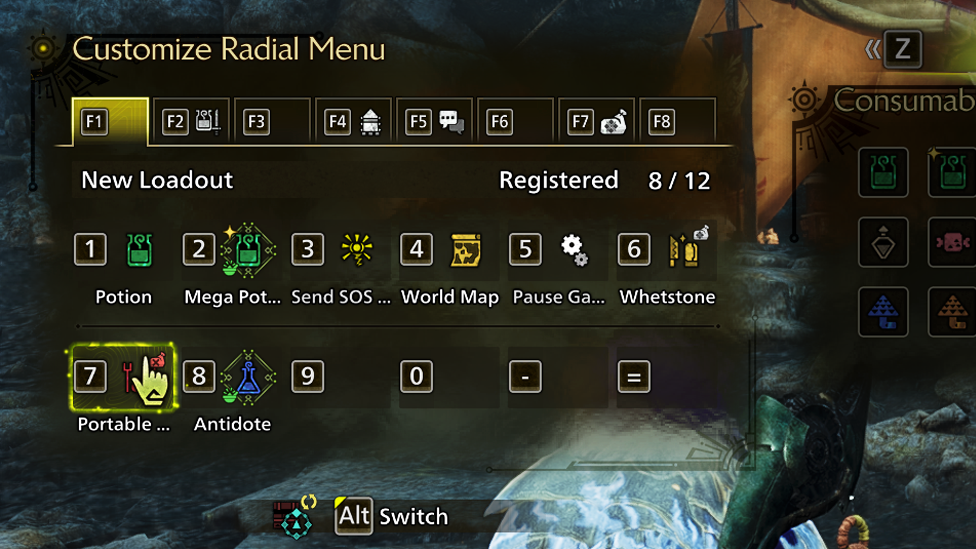
Customizing is fun, but if you’re new or just overwhelmed with options, here are some go-to favorites that make every hunt smoother:
- SOS Flare - Call in the cavalry when the monster decides you're lunch.
- Whetstone - Keep your weapon sharp, or become monster chow.
- Optimal Health Recovery - Auto-pick the best potion to get you off death's doorstep.
- Optimal Status Recovery - Instantly remove that annoying poison or paralysis debuff.
- Pause Game - Step away mid-hunt without dying. Yes, please.
- Detailed World Map - Cuts out the guesswork. Know where everything is, fast.
- Portable BBQ Grill - Cook meat. Feel powerful. Look cool doing it. These are just suggestions—every hunter’s Radial Menu should match their style. Whether you’re a trap master, healing support, or full send DPS lunatic, this menu is your sandbox.
Unmatched Server Performance For Any Game with ScalaCube
If you want a seamless and secure gameplay without lag or disconnects? Partner with Scalacube - Their dedicated game server can improve your experience even further. With customized configurations, guaranteed stable performance, and low-latency connections, Scalacube server hosting allows for smooth multiplayer matches. Not just that, with Scalacube you also get to enjoy full FTP access, mod support, DDoS protection, and 24/7 support—all at unbeatable prices.
Wrapping Up
The Radial Menu Monster Hunter Wilds isn’t just a quality-of-life feature—it’s a full-blown hunting upgrade. Whether you're crafting on the fly, sharpening your weapon mid-dive roll, or calling in backup while your screen is 90% fireball, a well-set Radial Menu is the difference between hunter and hunted. So go on—tweak it, save it, test it out. Your future self (and your future loot) will thank you.
FAQs
Can I use different Radial Menus for different weapon builds?
Yes! With 36 loadouts available, you can create Radial Menus that perfectly match your weapon, playstyle, or mission needs.
Is crafting through the Radial Menu faster than using the regular menu?
Absolutely. Once set up, crafting through the Radial Menu is nearly instant, saving precious seconds in battle.
Can I accidentally use the wrong item with Radial Menu?
Only if you misclick or misplace it! Use emblems and smart placement to organize your wheels clearly—it makes a big difference.