How to Abandon Quests in Monster Hunter Wilds
Monster Hunter Wilds is full of surprises. Every time you think you’ve seen it all, the game throws something new at you. A big part of what keeps the series fun and fresh is how layered it is. Hidden systems, subtle tricks, and clever ways to take advantage of the game world—it’s all part of the experience. And one system that most players overlook is the ability to abandon quests. Now, this might sound like giving up. But abandoning a quest in Monster Hunter Wilds isn’t about quitting. It’s actually one of the smartest ways to farm rare materials and control the world around you. If you know how to use it, this system can save you time, effort, and even Guild Points. Let’s break down what the Abandon Quest system does, how to use it, and why it matters more than you think.
How to Abandon Optional Quests in Monster Hunter Wilds
Make Your Own game Server
The game gives you a few ways to leave a quest early. You can do it offline or online, and the method is always simple. Here are the three ways to abandon a quest:
- Use the Start Menu: During any quest, pause the game and go to the “Missions & Quests” tab. From there, you’ll see an option that says “Return From Quest.” This lets you abandon the mission right away and go back to base.
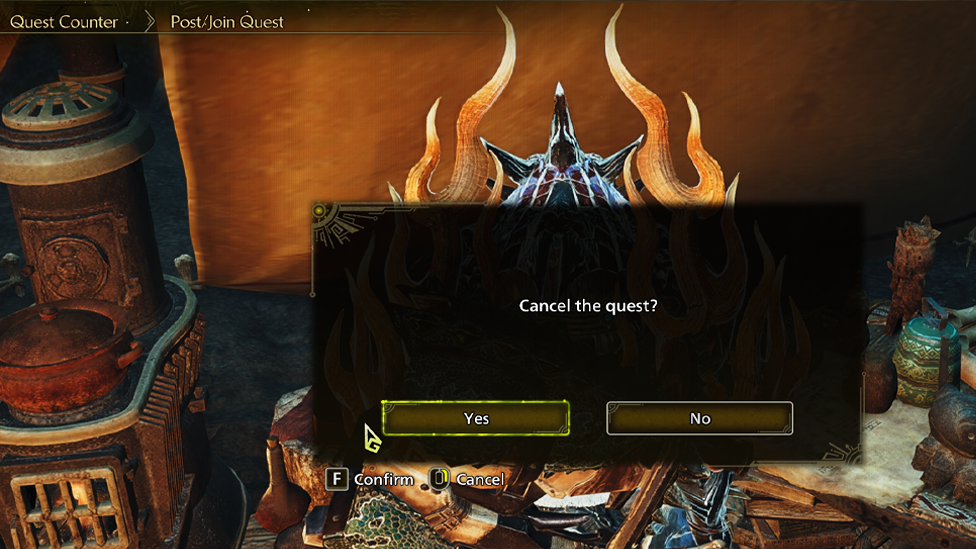
- Talk to Alma: After you accept a quest from Alma, you can go right back and talk to her again. She’ll give you the option to abandon it on the spot. This is a nice option if you change your mind before heading out.
- Inside a Tent: Whether you’re at the base camp or a pop-up tent in the wild, you can enter and open the quest menu. There, you’ll find the same “Return From Quest” option. It works just like the one in the Start Menu. These options are always available during optional quests. You won’t be penalized for using them, and they’re super helpful once you understand what they really do behind the scenes.
Why Abandoning Quests Can Be Useful
Abandoning quests isn’t just about skipping out. In Monster Hunter Wilds, it’s a smart way to manipulate two major systems: seasons and time of day, and resource respawns.
Change the Season and Time of Day for Free
When you pick up an optional quest, the game loads a specific version of the world. That version has a set season and time of day tied to it. This includes things like Rainy Mornings in the Wetlands, or Full Moon
Nights during Plenty in the Windward Plains.

If you want to farm items that only appear under certain conditions, this is one of the easiest ways to make it happen. Take the Nightflower Pollen, for example. This rare item only spawns at night, during a full moon, in the season of Plenty, and only in two specific regions: the Windward Plains and the Scarlet Forest. You could spend 300 Guild Points to rest until those exact conditions appear… or you could do something smarter.
Just pick an Optional Quest that starts at night, during Plenty, in the right region. Then enter the quest, gather what you need, and abandon it. No points spent. And if you didn’t find what you were looking for? Just start the same quest again. You’ve now got a loop that costs nothing and can be repeated as many times as you want.
This is a clean and efficient way to farm rare items without having to burn through your Guild Points.
Reset Resource Spawn Points
This is the second reason why abandoning quests can be powerful. Every time you start an Optional Quest, the game respawns all the materials in that area. If you abandon the quest and start another one, everything resets again. This means you can go back and farm plants, bugs, ores, and more with ease. However, there’s actually a faster way to do this if all you want is to respawn materials. Instead of picking and abandoning quests, try this:
- Fast-travel to a different region.
- Once you arrive, fast-travel right back to your original location. That’s it. All the resources in your original area will now be refreshed. It’s quicker than abandoning quests, and you don’t have to go through the process of loading a mission. Still, using quests to reset resources can be useful in some cases, especially if you’re already planning to use a specific season or time of day.
Things to Keep in Mind
There are a few important tips to consider before you start abandoning quests as part of your farming strategy.
- Only works with Optional Quests: You can’t use this method with Story or Assignment Quests. It has to be optional.
- Not polite in multiplayer: If you’re in an online lobby and other players have joined your quest, abandoning it without saying anything is frowned upon. Try to avoid doing that unless everyone’s on the same page.
- No penalties for abandoning: You don’t lose items, and there’s no punishment for leaving a quest early. Just make sure you don’t faint or fail before leaving, or it might affect your rewards.
Seamless Multiplayer Hunting with ScalaCube
If you’re planning to use these farming tricks with friends, a stable server is essential. Hunting together can be fun, but only if your connection holds up. That’s where ScalaCube comes in.
ScalaCube makes it easy to set up your own dedicated Monster Hunter Wilds server. You don’t need technical knowledge or setup time. Just launch the server, invite your friends, and start the hunt. With low-lag performance and 24/7 customer support, you’ll spend less time dealing with disconnections and more time slaying monsters.
Their servers let you control the game world exactly how you want it. Whether you’re coordinating quest abandon loops or farming rare resources, everything runs smoother when you’re on your own server. You can customize your settings, invite who you want, and keep your gameplay consistent every time.
FAQs
Can I abandon Story or Assignment Quests?
No, only Optional Quests can be abandoned mid-mission.
Do I lose any items for abandoning?
Nope. You won’t lose anything unless you faint or fail the quest before abandoning.
Can I use this trick to hunt monsters faster?
Not directly. It’s better for resource farming and world control, not combat shortcuts.
Conclusion
The Abandon Quest system in Monster Hunter Wilds isn’t about quitting. It’s a powerful way to control your game world, farm faster, and get the materials you need without wasting time. By learning how to use this tool well, you’re giving yourself a major edge—especially in the mid to late game. So next time you’re out hunting, don’t be afraid to hit “Return From Quest.” It might just be the smartest move you make all day.