How to Install Mods in Schedule 1
If you’ve ever felt that the base game of Schedule 1 feels a little barebones at the minute, you wouldn’t be alone, and there are a lot of little details that still need to be smoothed out once the full version of the game comes out. After all, don’t forget that Schedule 1 is still in Early Access; with that being said, that shouldn’t mean you have to miss out on the best parts of the criminal life. In line with this thought, there are plenty of excellent mods you may want to install in Schedule 1, and today, we’re exploring how to install these in your game. After all, it’s not always immediately clear on how to install mods in Schedule 1; still, once you know how, it’s pretty easy to do!
Why to Install Mods in Schedule 1
Make Your Own game Server
Let’s face it — Schedule 1 is already an incredibly popular game, and for good reason; indeed, its unique story and concept have certainly made it an appealing choice for many players ever since Early Access opened. Nevertheless, the game’s unfinished nature leaves plenty of room for opportunities to implement a wide range of features. Indeed, installing mods offers an excellent way to overcome difficulties with your game, be it introducing new features or simply streamlining existing game mechanics. However, it’s always important to be careful when downloading mods or any form of content from online. Fortunately, mods can help bridge those gaps - however, you’ll need to know how to install mods in your game before you get started. Fortunately, we’ve outlined a few handy things to know to help with this as follows.
How to Install Mods in Schedule 1
By now, if you think that modding your game of Schedule 1 sounds like the strategy for you, there’s some good news: installing mods in Schedule 1 is actually incredibly easy once you know what to do!
1 Install MelonLoader
Before you can start playing around with new mod features, you’ll need a mod loader. There are several options here, but for Schedule 1, the go-to tool used by most people is MelonLoader — a third-party program designed specifically for Unity-based games. Once you have downloaded the latest version of the installer, run the app, and it will automatically scan your PC for compatible games. Once it finds Schedule 1, you’ll then want to select the game (or manually search for it).
2 Find the Mod Folder in Steam
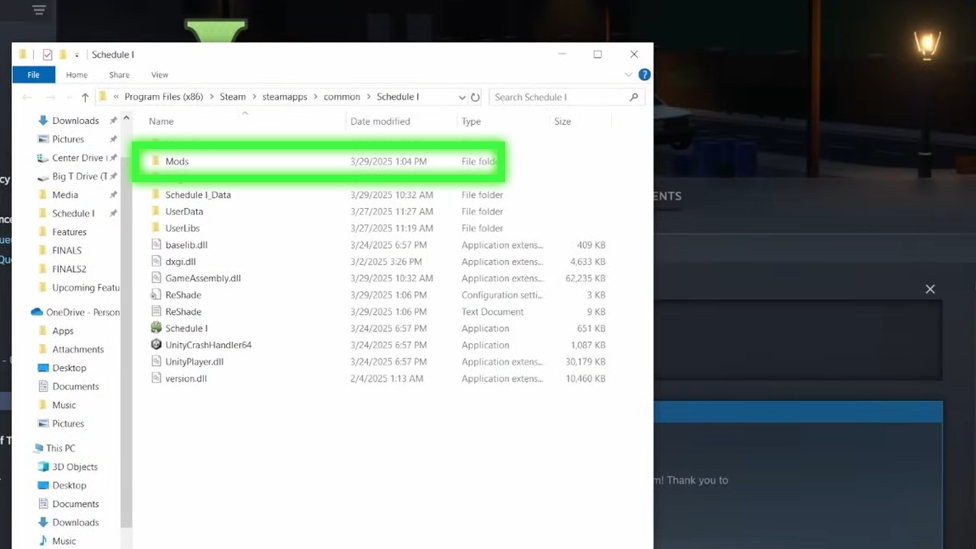
Once MelonLoader is set up, you’ll then need to find the Mods folder it created. If you downloaded Schedule 1 through Steam, the easiest way to do this is to head to your Steam Library and right-click on Schedule 1, then select Manage > Browse Local Files. From here, inside the game directory, look for the Mods folder, which is where all of your downloaded mods will go.
3 Download Schedule 1 Mods
Now that Melon Loader’s all set up, you can get started with downloading mods to your device. Keep in mind here that, while most Schedule 1 mods will hopefully be safe, this isn’t a universal truth, and there are likely many malicious mods out there that are infected with Malware. As such, it’s generally best to stick with reputable platforms like Nexus Mods or Mod.io, both of which offer dedicated Schedule 1 sections. Always ensure your anti virus software is up to date before downloading anything from the internet, too. Don’t forget, though - it’s not just downloading mods that could put your game at risk. DDoS attacks on your game’s server could potentially also compromise safety. Given this, you may want to launch Schedule 1 on a private ScalaCube server.
4 Move Files Into the Game Folder
After downloading your file and unzipping the zip file, you’ll then need to transfer all of the .dll files into the Mods folder you located earlier. Keep in mind here that some mods will come with configuration files (like .cfg or .json), in which case, you’ll need to follow the instructions on the mod’s page to ensure they are set up properly. A word of warning: be careful not to rename or move the files unless instructed, even if their names seem messy or confusing. Indeed, most mods will often have strict naming and directory structure requirements, and changing this could stop the mod from working properly.
5 Test Your Newly Modded Game!
That’s really all there is to it! Now, simply load the game to see if your new mods are running efficiently. If you’ve had any problems, many popular mods have dedicated Discord servers or forums that may help you work out where an issue might arise.
FAQs
What is the best mod launcher for Schedule 1? MelonLoader is generally considered the most effective and efficient mod loader for Schedule 1.
Are there mods available for Schedule 1 in early access? Yes! There are many mods available for Schedule 1, even though the game is in Early Access. However, keep in mind that these mods may not continue working in later versions of the game.
Final Thoughts
Installing mods in Schedule 1 is a pretty simple process, and as such, this may be something you want to explore for your own game as well. However, keep in mind that Schedule 1 mods are still pretty new, and always take care to ensure you’re downloading safe files and not ones infected with malware.