How To Fix Your Dealer Not Working In Schedule 1
So, you’ve built your grow empire in Schedule 1, got your uncle off your back (kind of), and you're ready to kick back while your trusted Schedule 1 dealer, Benji, handles the sales. Only... Benji's just vibing in his corner. Not selling. Not moving. Not working. Classic Benji. Before you rage-quit and accuse him of ghosting your empire, relax. You're not alone—dealers in Schedule 1 can bug out, especially with the game still being fresh out of the oven. Let’s walk through the not-so-glamorous but totally fixable ways to get your slacker Schedule 1 dealer back on his feet and your empire rolling in cash.
Step 1: The Sacred Ritual of Restarting
Make Your Own game Server
Let’s start with the ol’ gamer classic: turn it off and back on again. Seriously—restart your game. Sometimes you just need to reset dealer Schedule 1. If that doesn't work, it's time to go a bit deeper.
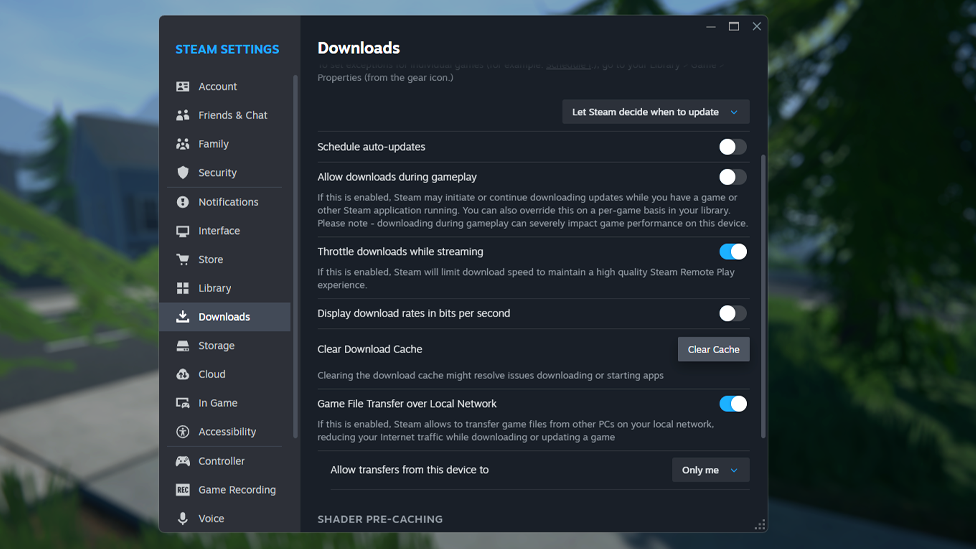
- Open Steam
- Go to Settings > Downloads
- Hit that Clear Download Cache button (don’t panic—it just restarts Steam)
- After Steam boots up again, right-click on Schedule 1 in your Library
- Select Properties > Installed Files > Verify integrity of game files This process has fixed issues ranging from co-op glitches to random crashes. There’s a good chance it might give Benji the digital slap he needs to get back to work.
Step 2: Check If You’re Accidentally Being Too Helpful
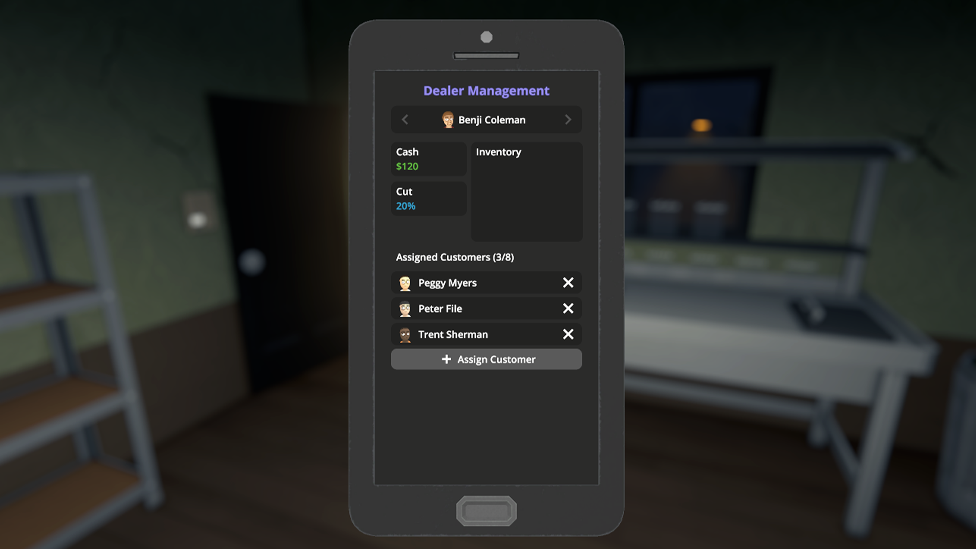
Sometimes the problem isn’t Benji—it’s you. Hear me out. If you’ve been delivering product yourself to customers that are already assigned to your Schedule 1 dealer, you might be confusing the poor guy. The game gets all frazzled when it sees two people selling to the same dude. Here's what to do:
- Check which customers are assigned to your Schedule 1 dealer
- If they still text you asking for more, ignore them (they’re being shady, trust me)
- Let your dealer do his job, solo And while you’re at it, double-check your Schedule 1 dealer inventory. If he’s got no product, he’s got nothing to sell. He’ll actually text you (like a clingy employee) when he runs out of stock. Keep him supplied! Pro tip: You can catch him at home in the morning before he starts walking around town. Swing by, load him up with jars, and send him off to work.
Step 3: When All Else Fails... Merc Him
Okay, hear me out—this isn’t as messed up as it sounds. If Benji’s pathfinding is so broken that even restarting, clearing cache, and validating files doesn’t help, there’s one fix left: take him out. Yes. Kill your Schedule 1 dealer. Here’s how:
- Knock him out, then incinerate him in a trash burner
- Throw him in a river (sleeping with the fishes style)
- Or just go full Walter White and shoot him Don't worry—he'll respawn the next day, completely unfazed, and hopefully reset back to a working state. It’s like dealer factory settings. Also, bonus: he doesn’t lose inventory, so you’re not wasting your stash. This reset has actually worked for a lot of players dealing with dealer stuck Schedule 1 and non-responsive dealers.
Premium And Trusted Game Server Hosting With Scalacube
If you want smooth gameplay, zero lag, and full control, ScalaCube’s game server hosting is the way to go. Designed for gamers who need reliability and speed, ScalaCube offers 99.9% uptime, zero latency, and custom server configurations to match your unique setup. With full FTP access, mod and plugin support, automated backups, and 24/7 support, you’ll be fully equipped to host intense sessions without interruptions. Plus, DDoS protection and global server locations keep your empire safe and always online. Now take all that performance and drop it into Schedule 1—a gritty crime sim where you rise from a broke dealer to a kingpin in the rough streets of Hyland Point. With drug production, street distribution, automated operations, and deadly cartel warfare, you need a server that can keep up.
Wrapping Up
Your Schedule 1 dealer is the backbone of your criminal empire in Schedule 1, but they’re still NPCs at the mercy of a few bugs. Whether it’s a simple restart or straight-up murder, there are multiple ways to get them functioning again. Just remember: don’t cross the dealer streams (you and them selling to the same customers), keep them stocked, and if push comes to shove—dealers are disposable… but only in the digital world.
FAQs
Will killing my dealer make me lose progress or money?
No! Dealers keep their inventory even after death and will respawn the next in-game day ready to work (hopefully bug-free).
Why is my dealer not selling anything even when stocked?
Make sure you're not also selling to their assigned customers. That causes a weird bug that makes them get stuck trying to sell to someone who already got served.
How do I assign customers to a dealer?
This is handled automatically. When you stop responding to a customer’s texts and assign them to your dealer, they’ll stick with them instead. Just don’t interfere after that.