How to Fix Stuttering in Schedule 1
Let’s face it - when playing our favorite games, few things are as frustrating as the dreaded frame rate drop. Indeed, stuttering can also be a major source of frustration in Schedule 1, too, and this leaves many people feeling annoyed and fed up. After all, while you’re busy with illicit activities, you simply don’t have time for your game to start lagging on you! Well, luckily, this doesn’t have to be something you accept, and our teams are on hand to help you tackle the dreaded lag in your next game of Schedule 1.
How to Fix Stuttering in Schedule 1
Make Your Own game Server
Stuttering in Schedule 1’s undoubtedly frustrating, but there are plenty of ways to fix — or even prevent — it from happening in the first place!
1 Make Sure Your PC Can Run the Game
Without a doubt, one of the most important first steps when trying to fix stuttering in Schedule 1 is simply to ensure your PC’s able to run the game! Indeed, while Schedule 1 isn’t a big or power-hungry game, it’s nevertheless still crucial to check whether your device’s systems will be able to handle it. If you do find the game is stuttering regularly, consider ways to speed up the device, such as turning off other apps or (if playing on a laptop) plugging the device into a power supply.
2 Set Up A Private Server Game
Another option you could consider before evening starting your new save is to play the game on a private Schedule 1 server. Indeed, private servers offer an excellent solution to help ensure uptime doesn’t drop out, reducing lag and ensuring your game runs smoothly at all times. Of course, this can only mitigate server-related stuttering; nonetheless, it’s still a good option to rule out just in case.
3 Use the Clear Trash Console Command
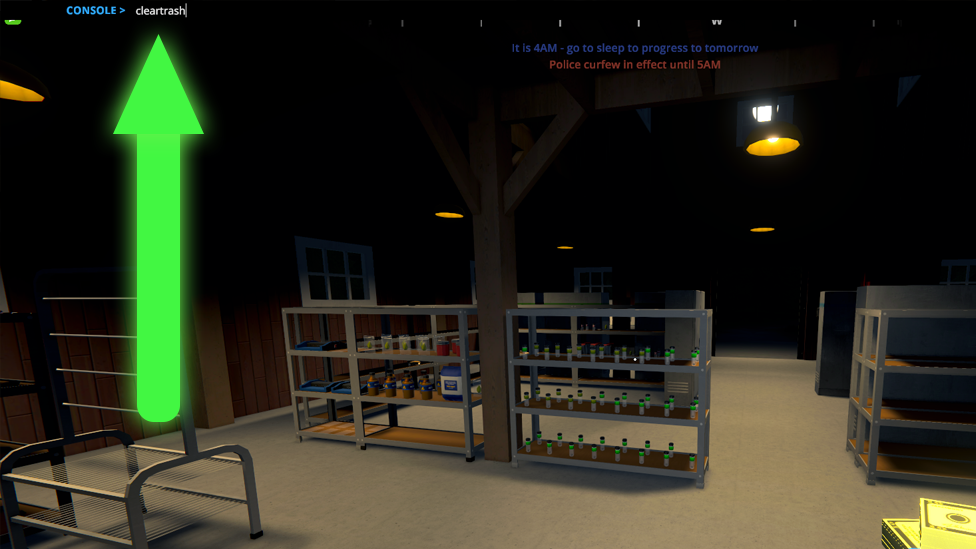
The world of Schedule 1 is positively littered with trash, and in the early game especially, this can represent a pretty lucrative source of spare change. However, since it always respawns back in after you’ve picked it up - and given that, at some point, you’ll likely stop collecting it as often - there’s a good chance trash will begin to build up in the game.
Now, this doesn’t seem like it should be a major problem, but in reality, it can cause the game to slow significantly! With so many extra objects in the game world, your game may begin to lag, which means you’ll need to clean up the trash.
Don’t worry, though - you don’t have to go around every single street with a trash picker. Instead, you can simply clear all of the trash by entering Console mode from the Settings menu, and then hit the ~ key and enter the command, “Cleartrash”. This will get rid of all the built-up junk in the world. If the extra unneeded objects are the cause of the stuttering, this should pretty quickly fix the problem.
4 Tweak the Graphics Settings
Let’s be real - if you’re struggling with a stuttering game, the most obvious solution is simply to change the graphics settings and quality. Ultra high quality is always nice to play in, but if your laptop or computer is struggling to run it, dropping the quality is worth considering. Furthermore, SSAO and godrays can also have a significant impact on the efficiency of your game, so this is well worth keeping in mind.
5 Disable Overlays
In many cases, overlays can be incredibly helpful; however, they can potentially also slow things down and lead to lag. Given this, if you’re playing with overlays from Steam or Discord, you may want to disable these and restart the game to see if this helps with performance.
6 Use a High-Performance GPU
If you have a high-performance GPU installed in your device, you may want to consider running the game on this rather than the default option chosen by your device. This could help increase the performance of your game, in turn making it easier to play the game
FAQs
Q1. Why is Schedule 1 stuttering or lagging? There are many different reasons that your game of Schedule 1 might be lagging. Your laptop may not have enough CPU to run the game effectively or may not have the necessary specs to run the game. Alternatively, you could have the graphics too high, overlays could be impacting performance, there could be a lot of litter in the game world, or your server may be too slow. Q2. Will leaving litter in Schedule 1 impact my game? There’s no direct in-story consequence to leaving litter in Schedule 1. However, litter will build up over time, resulting in a large number of objects in the game that could potentially lead to lag or stuttering.
Final Thoughts
If you’ve been hoping to enjoy a new game of Schedule 1, ensuring your game is able to run smoothly is a must. Fortunately, since Schedule 1 is a pretty lightweight game, you don’t necessarily need the strongest computer in the world to run it. Nevertheless, it’s well worth being aware of the potential opportunities to reduce lag to make the most of your next playthrough.