How to Drop Items in Oblivion Remastered
Here's a game that allows a player to explore and enjoy lots of adventure. But at one point, the fun starts to weigh in, and player characters must compromise. As the gameplay continues, player characters must drop items in Oblivion Remastered. They need to release the unnecessary stacks they've picked up along the line. If they don't, these loads will limit their sprints and fast-traveling techniques.
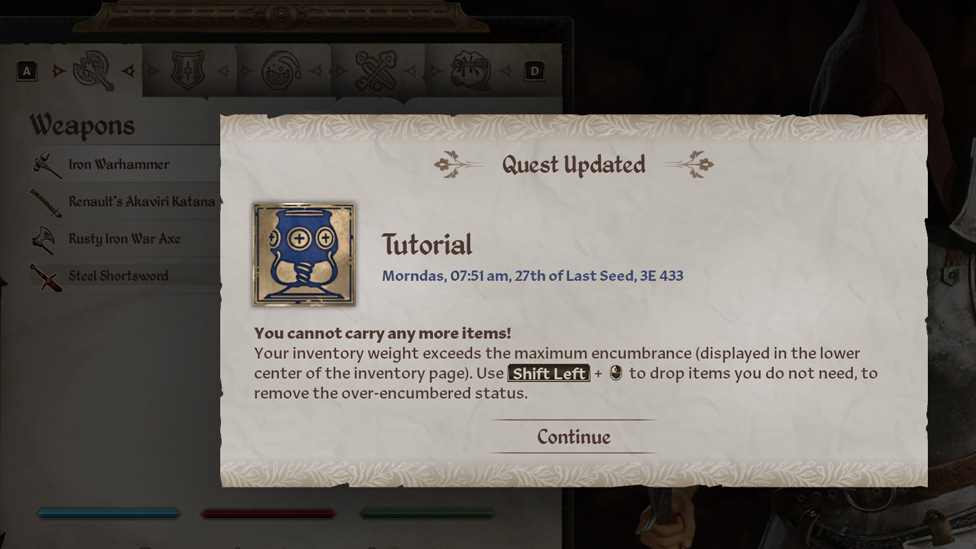
Picking up too many stacks puts a toll on you as the main player character, making your inventory over-encumbered.
What Are Drop Items in Oblivion Remastered?
Make Your Own game Server
Drop items in Oblivion Remastered are resources that you thought you needed but found worthless along the way. These items may also be useful in the sense that you wish to keep them but feel the need to release a few things from your inventory. Either way, drop items are stuff that you must release from your inventory to sprint better and travel faster.
Why Dropping Items in Oblivion Remastered Is Important?
As the main player character, you just can't help but be sharp and fast with your navigation. And if something is weighing you down, you have no choice but to let it go. It's the same case with life. If a problem seems to be weighing you down, let go. Only in the case of an excess drop item, you may choose to sell off resources in your inventory. When you drop items from your inventory, you become faster. Your sprints become better. And you can travel faster than when they were in your inventory. This will however cut down the delay in your journey and make you flexible enough to take on any challenge.
How to Drop Items in Oblivion Remastered
Let's get on to the real aspect: how to drop items in Oblivion Remastered. First, understand that these stacks are stored in your inventory. That's where the important and useless items are kept. You can either choose to drop one item or the whole stack. Go to your inventory and switch over to the All Items tab. There you'll find all items stored. You can then highlight the ones that you wish to do away with. To drop an item, use the prompt below:
| Drop a Single Item | Drop the Whole Stack | |
|---|---|---|
| PC | Left Shift Key + Left Button Mouse | Left Control Key + Left Mouse Button |
| Xbox | X Button | Hold the X Button |
| PlayStation | Square Button | Hold the Square Button |
Follow the instructions in the table above and you can drop any item you wish to. If you mistakenly drop off an item, you can pick it back up. Tip: Player characters should refer to the weight of each item to remove the over-encumbered effects. This will allow for deciding how many items you ought to drop.
How to Carry Weight
The best way to avoid getting over-encumbered is to increase your carry weight in Oblivion Remastered. This will allow you to carry all necessary items without making constant rounds to your storage box. And there are several ways to do this. You can either:
- Improve your points in the Strength Attribute, as each point raises the maximum Carry Weight by 5.
- Apply potions like Fortify Strength or Feather Effects to temporarily remove over-encumbered weight, so you can sell off goods you don't need.
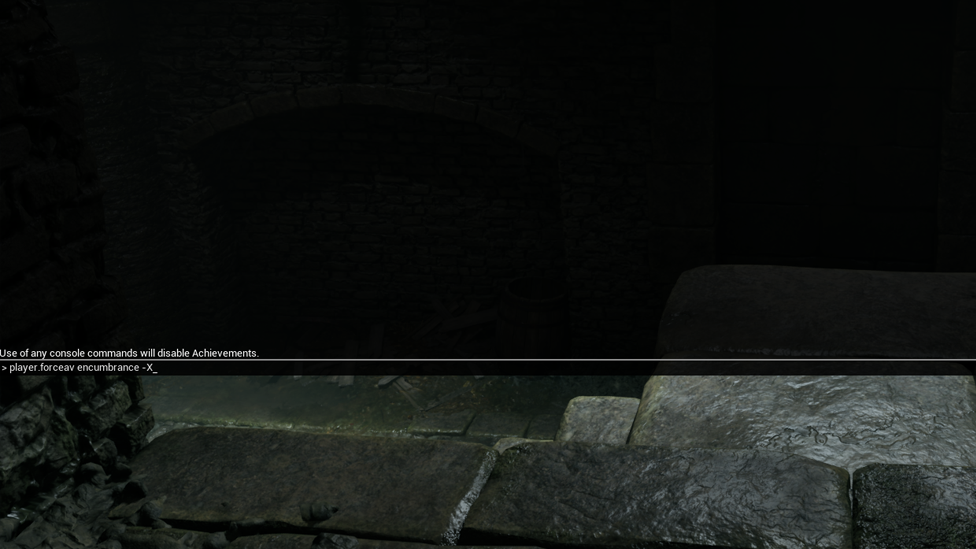
- Use the "player.forceav encumbrance -X” console command. Then replace “X” with the number of the maximum weight you want to add to your character. Note that using the console command can disable achievements.
There you go! Your carry weight is above par. While you do this, always ensure to monitor your weight status to know the amount of carry weight to add or the number of items to drop. Also, note that the methods for increasing the carry weight in Oblivion Remastered are the same for every game console, be it PC, Xbox, or PlayStation.
Why You Must Use Scalacube!
As you venture into the Oblivion world, it is necessary to look for items that you can pick up. When they become too much, it is mandatory to drop some weight. All these can't be done with a poor server. This is where Scalacube comes in. Scalacube provides player characters with full functionality. It offers features such as high mod support, dedicated server files, optimal privacy, high security, unlimited bandwidth, and many more. If a player wishes to, he can create a customized-themed interface with a good SSL encryption to prevent hackers from penetrating the server. Scalacube also allows for speaking with a customer representative at any time of the day. You should give it a try!
FAQs
Why Is It Necessary to Drop Items in Oblivion Remastered?
Dropping items in Oblivion Remastered is highly crucial for players who wish to release a few weights to fine-tune their sprints while speeding up their fast-traveling technique.
How Many Items Can I Drop in Oblivion Remastered?
You can choose to drop an item in Oblivion Remastered. You can as well select a few items to drop or release the whole stack.
Can I Increase My Carry Weight in Oblivion Remastered?
Yes. You can increase your carry weight to contain all your stacks. All you need to do is follow the instructions given in the section above.
What Is One Method to Increase My Carry Weight in Oblivion Remastered?
Use potions like Fortify Strength or Feather Effects to reduce your over-encumbrance status so you can sell off any goods in your inventory.
Conclusion
As you now know, you can drop items in Oblivion Remastered as the main player character. You can as well increase your carry weight to fit in and balance the toll that every stack puts on you. To do these, press the right buttons and initiate these changes. This may depend on the controller and provider that you use for the gameplay. When players pick up too many stacks, it puts a heavy toll on them, making them over-encumbered. This guide explains how to drop unnecessary items and free up your storage space. A good idea is to only pick items that you can manage. If need be, drop one, a few, or release the whole stack. The ball is in your court now.